

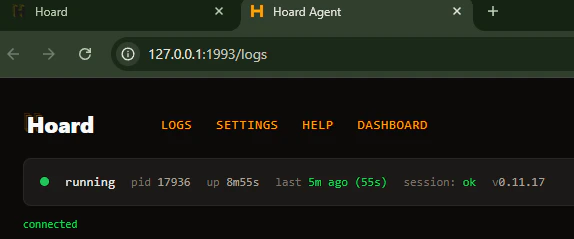
Hoard connects but never syncs
The status shows “Waiting: no_sync_needed” repeatedly. Cause: The server hasn’t scheduled a sync yet, or auto-sync is paused. Fix:- Go to Settings → Sync and make sure Automatic Sync is On
- Click Sync Now on the Dashboard to trigger a manual sync
- Check your Sync Frequency setting (default: every 24 hours, once daily)
running, session: ok, and Waiting - no sync needed right now. That means Hoard is healthy and simply has not been asked to sync yet.
Check the last timestamp at the top of the Hoard Desktop window against your Sync Frequency. If your last sync is older than your schedule and this line keeps repeating, Sync Now always gets you a fresh sync — use it, then email support@tryhoard.com so we can look at the schedule.

”Permission denied” on Mac
macOS blocks the app (“unidentified developer”)
macOS blocks apps not from the App Store. This affects both Hoard Desktop and the Hoard Agent binary. Fix 1 — right-click method (no Terminal needed): Right-click (or Control-click) the file, choose Open, then click Open again. You only need to do this once. Fix 2 — Terminal: Replacehoard-desktop with your actual filename if it differs.
hoard-agent instead:
Windows SmartScreen blocks the app
Fix: Click More info, then Run anyway. This only happens on the first run.”Chrome not found” or browser errors
Hoard uses Chrome for automation. If Chrome isn’t installed, it downloads Chromium automatically. If the auto-download fails:- Install Google Chrome manually
- Restart Hoard
Hoard crashes or exits immediately
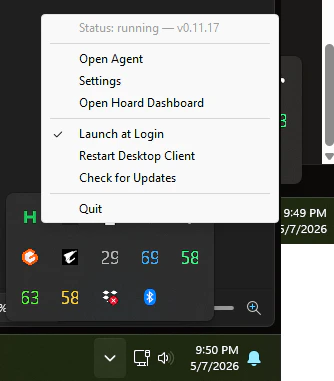
Check the error messages for the cause. If you run the agent from the command line, the errors print in the terminal. On Hoard Desktop, open the tray menu and choose Open Agent Logs to see them. Common causes:
For Hoard Desktop, use the tray menu if you need to restart the app itself.
”Cooling down after failure” message
When Hoard hits a failure during sync, it doesn’t immediately retry. Instead, it waits a bit before trying again to avoid hammering a broken step repeatedly:
You’ll see a log message like
Cooling down after failure (5m0s) in the logs (in the terminal if you run from the command line, or under Open Agent Logs on Hoard Desktop). This is normal. Hoard is giving TCGplayer (or your network) time to recover before retrying.
The counter resets after a successful sync. If you’ve fixed the underlying issue and don’t want to wait, just restart Hoard.
Debug screenshots on failure
When something goes wrong during a sync step, Hoard automatically captures before and after screenshots of the browser and uploads them to the server. These help our support team see exactly what Hoard was looking at when it failed (a CAPTCHA page, a changed layout, an error message, etc.). You don’t need to do anything — this happens automatically. If you contact support about a sync issue, we can look up these screenshots to help troubleshoot.Hoard is running but dashboard shows “Offline”
The dashboard tracks when Hoard last checked in. If Hoard is running but shows offline:- Check the logs for errors (Hoard may be crashing on heartbeat) — the terminal if you run from the command line, or Open Agent Logs on Hoard Desktop
- Verify your
HOARD_API_URLis correct (https://www.tryhoard.com) - Check your internet connection
- Verify your API key is valid (check Settings → Account)