

What you’ll end up with
One row per listing. The columns are product name, set, condition, printing, language, quantity, listed price, target price and SKU ID.Step 1: Create a key
Go to Settings > Connected apps. In the API keys card, type a name like “Inventory sheet” and click Create key.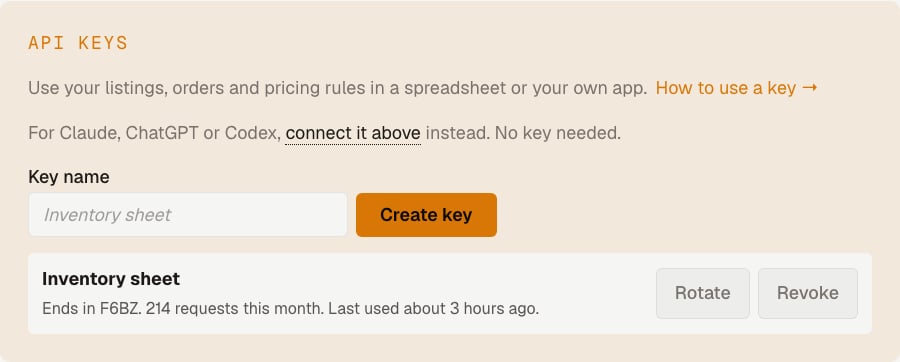
Step 2: Copy the key
Hoard shows the key once. It starts withhdk_. Copy it and save it somewhere safe, like a password manager. You will paste it into Google in step 5.
If you lose it, rotate the key to get a new one.
Step 3: Test the key
Click Test key. You should see “Works. First listing:” followed by one of your cards.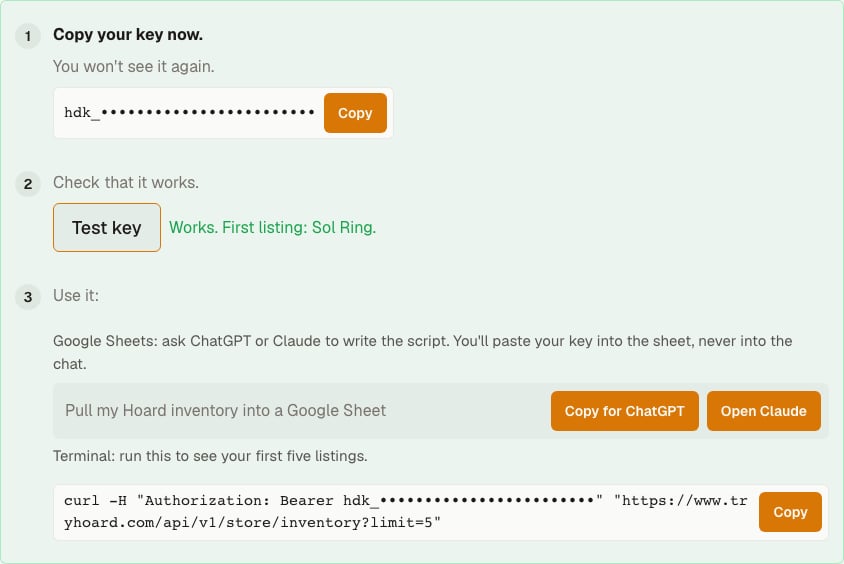
Step 4: Copy the prompt into an assistant
In step 3 on the same page, find the Google Sheets row. Click Copy for ChatGPT, then paste it into a new ChatGPT chat. Or click Open Claude to start a Claude chat with the prompt filled in. The prompt reads:Write a Google Apps Script for Google Sheets that pulls my Hoard store inventory into the active sheet. Call GET https://www.tryhoard.com/api/v1/store/inventory?limit=500 with the header “Authorization: Bearer ” followed by my API key, and keep calling with cursor set to next_cursor until next_cursor is null. Write one row per listing with these columns: product_name, set_name, condition, printing, language, quantity, listed_price, target_price, sku_id. Read the API key from Script Properties under the name HOARD_API_KEY, never from the code. Then walk me step by step through pasting the script, saving my key in Script Properties, and running it.Do not paste your key into the chat. The script reads it from Google later.
Step 5: Follow the assistant’s steps in Google Sheets
The assistant gives you a script and walks you through these steps.- Open a new Google Sheet.
- Click Extensions > Apps Script.
- Delete the sample code and paste the script the assistant wrote. Click the save icon.
- Click Project Settings (the gear icon), then scroll to Script Properties.
- Click Add script property. Set the property to
HOARD_API_KEYand the value to your key. Click Save script properties. - Go back to the editor and click Run.
- Google asks for permission. Click Review permissions, pick your account, and approve. If Google warns the app is not verified, click Advanced and continue. The script is yours, and it only runs in your sheet.
Step 6: Check the sheet
Go back to your sheet. You should see a header row and one row per listing. Large stores take a minute to fill. To refresh the data, run the script again. Ask the assistant how to run it on a schedule if you want that.Troubleshooting
If the key leaks, go back to the API keys card and click Revoke, or Rotate to get a new one.
For more on keys, see API keys. For every field, see Store data.