

September 12, 2026
A reworked scan review, one card at a time
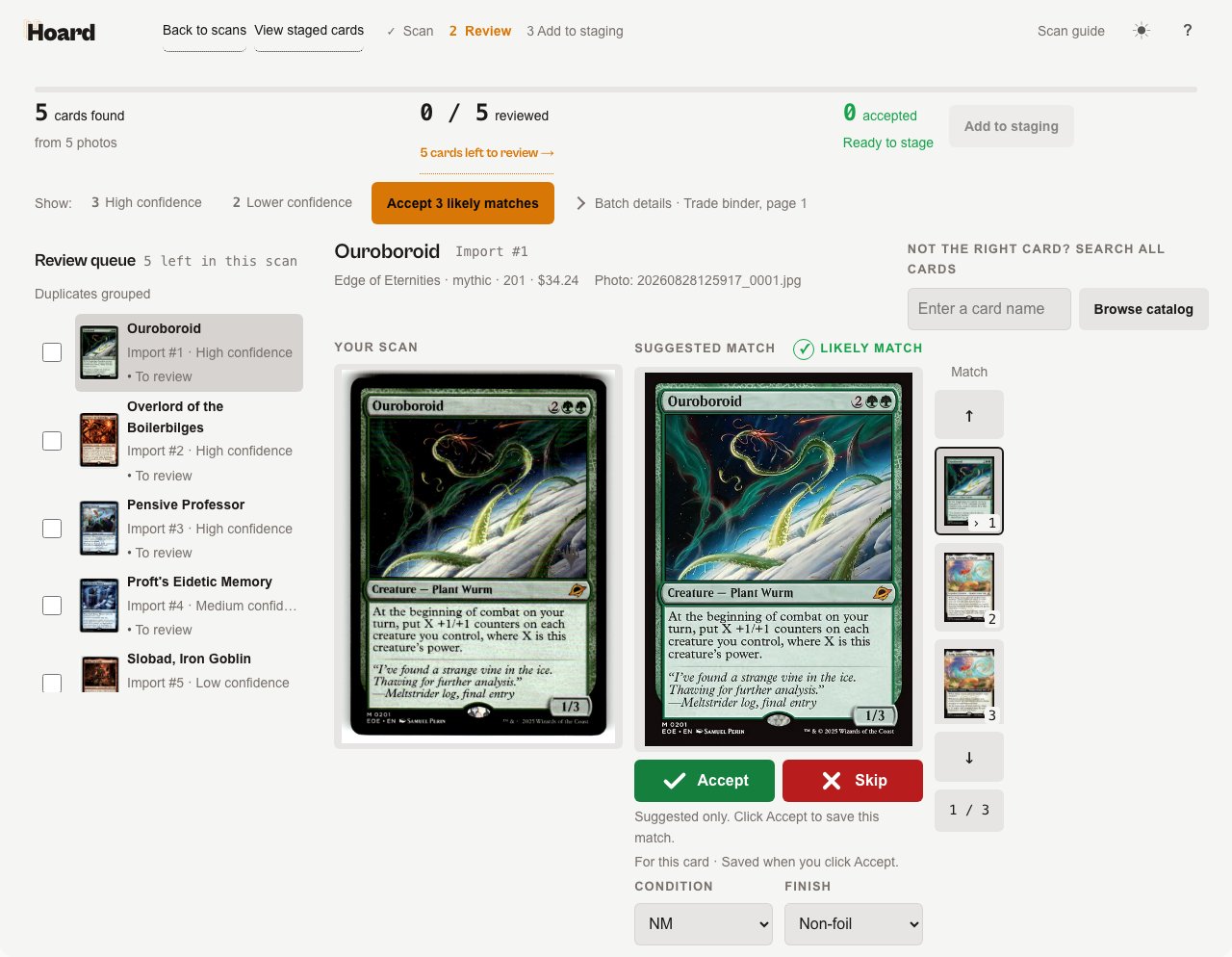
Scan review now walks you through one card at a time beside its suggested printing, with a full history page for every import you’ve uploaded.- A Your scans history page.
/collect/scanslists every import with per-batch crop thumbnails, your notes, status, and counts, plus a game filter to narrow a long list. - A ranked strip of candidates for each card. The suggested printing sits next to a strip of ranked thumbnails you can cycle through with ↑/↓; whichever one is showing is already the pending choice, so Accept saves it in one click.
- Rarity-family suggestions say Verify printing. These never get swept into a bulk accept, even alongside a batch of otherwise-confident matches.
- Progress broken into three groups. Cards found, cards reviewed, and cards accepted each get their own count, with Add N to staging right next to the accepted total.
- Filter to High confidence or Lower confidence, then accept the confident ones in bulk. Accept N likely matches confirms every eligible high-confidence card in one action.
- Browser back and forward step between cards. Move between cards you’ve already looked at without losing your place in the queue.
- A five-step Scan guide, replayable any time from the header on your scans, history, or review.
September 8, 2026
Scan cards with nothing installed
For supported games, uploading a folder of card photos from your browser now processes in the cloud. You no longer need Hoard Desktop running for the batch to start.- Upload and go. Pick your folder on
/collectand matching begins right away, with no desktop agent required. - Your recent imports, one click from a review.
/collectlists your recent scans with a link straight into each one’s review page.
September 3, 2026
Shelve a card anywhere and find it later
- Box and slot numbers as you place cards. Turn on Chaos sort box numbers in Settings → Repricing. Cards you add in Quick Add, in scan review, or from the card panel get the next box and slot, so nothing has to be sorted by set. TCGplayer sync never assigns a location.
- A Loc column and four search tokens on the Cards tab. Each card shows its box and slot. Search
box:5,loc:5-234,is:unshelved, oris:location-drift, sort the table by location, or number a whole filtered set with Shelve results. - Move and clear slots from the card panel. The My Copies tab has a Location row with a chip per slot, a Move control, a clear control, and a Shelve button for copies that have no slot yet.
Locations on the pull sheet and in CSV imports
- Pull sheets sort by box and slot. Once an account has a location, the Visual Pull overview can order lines by box, then slot. Each line shows the slot or slots it needs. Codes also print on packing slips and appear on the Orders tab.
- Import box numbers from another tool. The inventory CSV import reads a Location column in the common formats, including lettered boxes. Uploading the same file twice changes nothing.
September 1, 2026
Bring your MassPrice rules into Hoard
- Import your MassPrice rule set in one pass. From Settings → Rules, the desktop app reads your existing TCGplayer MassPrice rules and turns them into Hoard pricing rules. Every rule is previewed before anything is created, and imported rules start switched off until you turn them on.
- Match several values in one filter. Rule and search filters now accept comma lists, so
r:mythic,rareorcond:mp,hp,dmgmatches any value in the list.
Price a card in person with Comps
- A compact price sheet for in-person deals. The card detail panel’s new Comps view puts Market, Ask, Happy, and Hard Floor on one screen, with a button to pull current listings and recent sales, so you can quote a card at a show or across the counter.
- Save your own numbers without touching your listing. Edit and save your own Ask, Happy, and Hard floor as negotiation notes; saving never changes your live TCGplayer listing or your repricing target, and Reset restores Hoard’s current suggested numbers.
- One row of tabs on the detail panel. The panel now switches between History, Comps, My Copies, and QR from a single row.
Track TCGplayer Direct Reimbursement Invoices
- Reimbursement invoices sync automatically. Each invoice’s number, status, tracking, value, and full card list comes into Hoard on its own, including the pending invoice still accumulating toward the next reimbursement.
- A Reimbursement Invoices page. It lists every invoice plus the next accruing one; open invoices show up as a Today-tab pull action, and Hoard emails you when a new invoice generates.
- A guided pull for each invoice. An invoice detail page opens a visual pull that walks you through TCGplayer’s required ship order, one condition-and-set group per screen with quantities, foil flags, bin locations, and a progress bar.
- Deliver-by dates, flagged when overdue. Invoices show their deliver-by date (TCGplayer requires delivery within 10 days) and turn red once overdue.
- Discrepancies on completed invoices. A finished invoice shows the cards TCGplayer couldn’t verify and what was charged for them.
More on every card page
- Every finish, each with its own price. Card pages now show each finish a card comes in — Normal, Holofoil, Reverse Holofoil, and more — with its own market price.
- Ask an AI agent about a card. A button opens ChatGPT, Claude, Gemini, Grok, or Perplexity with a ready-to-run prompt about that card, or copies the prompt.
- Buy on TCGplayer is easier to find. On public card pages the button now sits high on the page, right under the card summary.
- More detail in printing and set views. Other printings show each printing’s card art and name the lines on the reprint comparison chart, “Cards in this set” shows the top cards as art in a grid, and the set name shows directly under the card’s title.
A clearer dashboard
- Suggestions stay short and current. Stale suggestions clear once their reason no longer holds, the list is capped to your top suggestions, and price-based suggestions expire within a day.
- Jump from an alert to the exact cards. The “priced 20%+ over target” alert now opens the Cards tab filtered to exactly those cards, and an auto-push hold gets a “View these cards” link to the paused batch.
- A more readable Track Record. The profit-lift chart and realized totals sit side by side with a clear starting point before Hoard’s first price, and a month-by-month sales table shows gross, net, orders, revenue at a Hoard-set price, and profit lift.
Sync and agent
- Auto-clear release announcements. Turn it on under Settings → Sync and the agent marks TCGplayer set-release announcements as read for you; order messages, refunds, and disputes are never touched.
- A reconnect prompt when the agent drops. If your agent loses its connection, the desktop app now shows a “Reconnect to Hoard” prompt and opens the dashboard instead of going quiet.
Settings and account
- Resend your email verification. From Settings → Notifications you can resend your verification link if your email was never verified.
- Downgrading to free keeps your store syncing. Your agent stays on and keeps syncing inventory and market data; store-writing actions like automated repricing still require a paid plan.
A calmer look
- Cleaner separators across the app. Cards, tables, and filters in the app and your emails now separate with space and fills instead of grey lines, and status banners across the dashboard and settings share one look.
Fixes
- Editing a rule no longer rewrites it. Changing one field on a pricing rule no longer silently rewrites or widens its query, and editing a sale rule no longer converts it to permanent; the Duration field pre-fills with the time remaining.
- The markup % field accepts -50% to +900%, matching the allowed range, and rule reorder arrows now show on desktop, not just mobile.
- Pokemon custom listings get a market reference price. Photo listings and other entries without a catalog ID no longer stay at $0 and get skipped by repricing.
- Your filters, sort, and page survive a view switch. Switching card views keeps your filters, consignor filter, sort, and page, and they persist across a reload or the Back button; omni search adds a “Load more” button and per-game filter pills.
- Price history uses the correct chart for more sets. Price history and recent sales now load for Yu-Gi-Oh Limited, UniVersus 1st Edition and Unlimited foils, and Elestrals Reverse Holo instead of showing the base card’s chart, and the market report page’s index chart renders instead of staying blank.
- You stay signed in to TCGplayer across updates, restarts, saving settings, and Reconnect, and sync logs now explain a stopped price push and show the full agent step trace in plain language.
- TCGplayer Direct orders stay out of your queues. Orders fulfilled by TCGplayer’s warehouse no longer clutter open-order and pull queues, and a canceled Direct order no longer counts as a sale.
- Onboarding and health emails reach social sign-ups. Sellers who signed up with Google or Discord now receive onboarding, digest, and agent-health emails.
- Interface polish. Toggles like the card page’s Normal/Foil switch drop the browser’s grey bevel, light and dark mode fade instead of snapping, and off-state toggles are now visible in light mode.
Public and market pages
- See seller photos in a public binder. Cards with a listing photo show a “View photo” button that opens the photo full-screen with tap-to-zoom, and slabs, sealed, and other custom listings without a catalog match now appear in the binder using your listing photo, linking to your store when you’ve set a store URL.
- More links from market and set pages. Every game’s market page links to biggest-movers, a market report, and most-valuable-sets pages, and set pages show the release date with releases marked on the market index chart.
- A working TCGplayer fees calculator. The fees calculator guide is now a live, working calculator.
August 25, 2026
Every card and set now has its own page
- Card pages are public. Anyone can view a card’s catalog info, market price, price-history chart, and other printings without signing in. Signed in, you still see your own holdings on the same page. A version picker next to the set name jumps straight to another printing.
- A pricing receipt on the detail panel. Open a card you own to see its last few sold comps, what your baseline rule would have set, and which rule made the current price.
- Manage a listing from its market page. When you own the card you’re viewing, a “Manage this listing” link opens its manage panel to reprice, watch, or print a QR label.
- Market pages show what a set is worth. Each set now lists its total market value, median card price, 30-day change, and how much of the set is priced, plus a roster of the set’s cards ranked by price. A game switcher in the header jumps you to any game’s market.
The market index chart
- Compare up to eight games at once (five by default) on one screen.
- A new “All” range shows the full history for a game or set; charts now reach back to February 2024.
- Trace any day. Hover or drag across the chart to read every game’s index value for that day, with a shared date readout.
- Colorblind-safe colors that stay legible in light and dark mode. Click a game in the leaderboard to open its set list and drill through to individual cards.
Follow prices up on a confirmed buyout
- Your change cap is now directional. Settings > Pricing has a new “Follow prices up” section with its own cap for upward moves. Your existing cap still controls downward moves only; leave the up cap blank and upward moves work as they did before.
- Skip the cap on confirmed buyouts. When Hoard has real evidence, a supply collapse or genuine sales volume, a spiking card tracks to market right away instead of being held back for days. It’s on by default for sellers with a change cap, and only skips the cap on confirmed evidence, so a price never runs away on an unconfirmed listing. Turn it off in Settings > Pricing to keep the old behavior.
- Price off recent sales, per game. A new per-game setting prices cards from recent trusted sales instead of your configured TCGplayer source, for games where TCGplayer prices lag. Cards without enough sales keep the normal source. Find it in Settings > Sync > Games & product types.
Eleven more games in Collect
Browse and build lists for Cardfight Vanguard, Alpha Clash, Dragon Ball Super Fusion World, Gundam, Union Arena, Weiss Schwarz, Battle Spirits Saga, UniVersus, Final Fantasy, Grand Archive, and Chrono Clash. Gundam cards filter by color and card type; Dragon Ball Super Fusion World cards filter by color.Scan a folder of photos from Hoard Desktop
Hoard Desktop can now scan a folder of card photos on your own machine. Open the desktop dashboard, choose Scan, pick a folder, and review matches at tryhoard.com/collect like any other scan. Your confirmed scans also replace watermarked catalog images with real card art.Custom photo listings show your own photo
A listing with no catalog card — a graded slab, a signed or altered card, or any photographed item — now shows the photo you uploaded to TCGplayer in the cards table and the detail panel, with a “Photo listing” tag and a View full photo link, instead of generic catalog art. These listings also open their detail panel now and price against the right finish.Connect an AI assistant to your store, faster
- A “Copy prompt for your AI agent” button on card pages copies a ready-to-paste prompt for looking up that card’s price and printings with tcgmcp, our free public price server.
- New setup guides answer “is there an MCP for TCG prices?” and “how do I connect an AI assistant to my store?”, with step-by-step instructions for Claude, ChatGPT, and Cursor.
- A one-week onboarding nudge points new sellers at connecting Claude or ChatGPT to their store, with copy-paste setup steps. It’s sent once, and only if you haven’t already connected one.
Fixes
- Quick Add and Export CSV now price every game. Non-Magic cards used to stage at $0 or fail to export; they now use the price you see in the grid.
- Pull durations show seconds instead of rounding to “0m”. An exact hour reads “1h 0m”, and a completed pull shows its final elapsed time instead of a timer that keeps counting up.
- Sync history explains a paused or handed-off price update instead of showing it as an unlabeled “skipped” step. A completed sync’s steps now read as done.
- Collect no longer scrolls sideways on a phone.
- Preorder products read “Preorder” with the release date instead of a bare ”—”, on both the card page and the set’s market page.
- The sync streak counter no longer miscounts near midnight. It now follows your store’s local day.
August 20, 2026
Recent sales comps
- See what a card actually sold for, not just what’s listed. The card detail panel now shows the last 10 tracked TCGplayer sales for a card, newest first, with date, condition, and the all-in price a buyer paid. Where the card’s condition is known, a comp estimate with a confidence level sits above the list.
- QR stickers now cite a real sale. The scan page’s comps list adds a “Last sold $X (condition)” line alongside TCGplayer Market and PriceCharting, when Hoard has a tracked sale for that card.
- Coverage grows as you use Hoard: checking a card’s market depth or watching it starts building its sales history. Cards with nothing tracked yet show a plain note instead of an empty section.
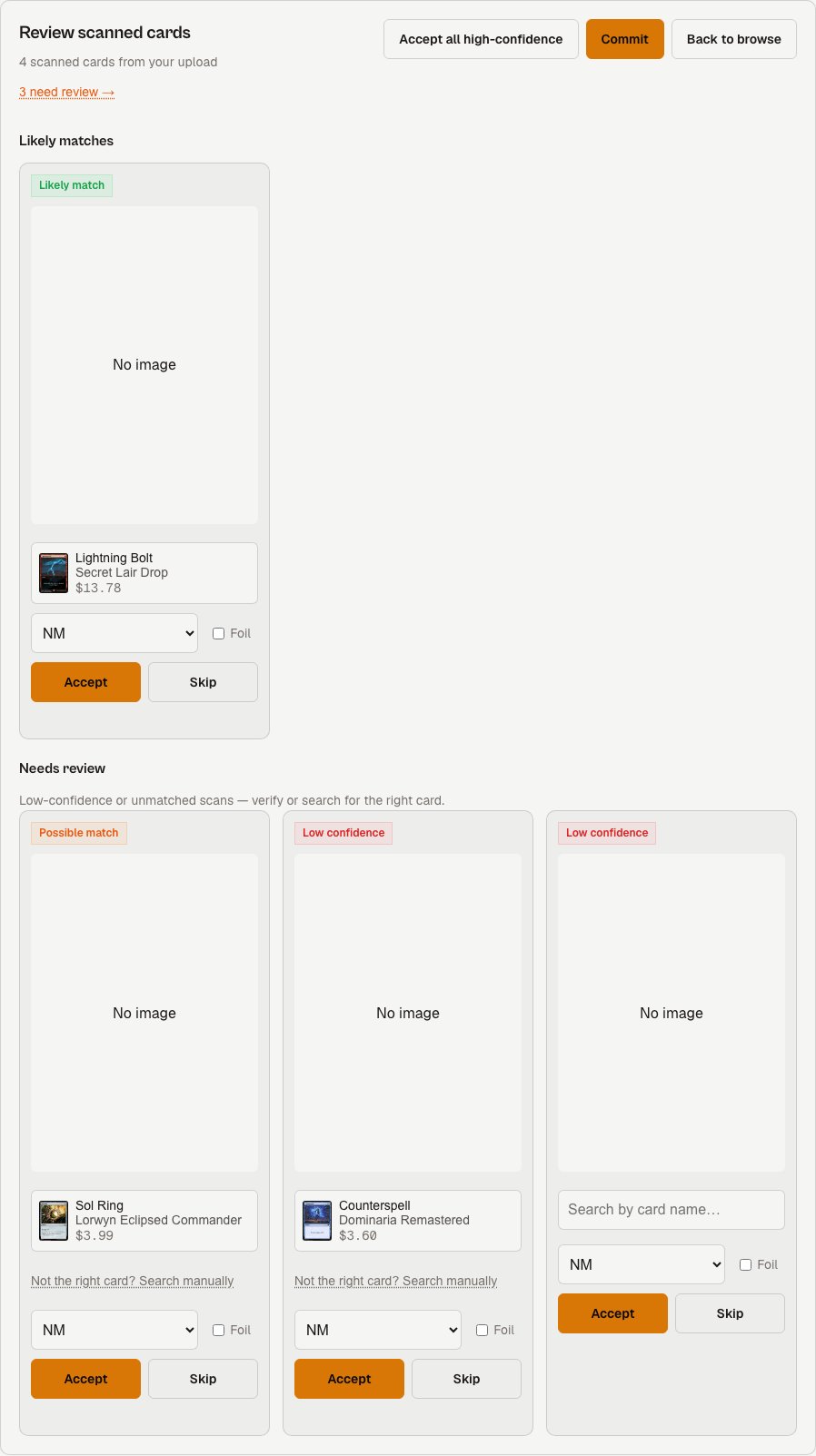
Scan review now shows you which matches need a second look
- Results are sorted by confidence. Scanned cards land in a Likely matches group or a Needs review group, so you know at a glance which ones to double-check before committing.
- A jump link takes you straight to what needs attention. The review header shows how many items still need review, with a link that scrolls right to them.
- Search manually for any card that needs review, not just unmatched ones. Every item in Needs review now has a manual search option if none of the suggested candidates are right, not only the ones with zero suggestions.
- Accept every confident match in one click. “Accept all high-confidence” clears the whole Likely matches group at once, so you can spend your time on the cards that actually need a look.
August 17, 2026
Pricing rules: quicker to set up, easier to read
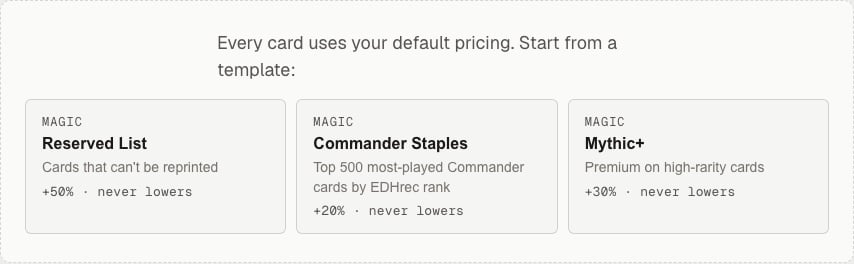
- Start from a template. With no rules yet, the Rules page offers a few starting points matched to your games. Each one opens the rule builder pre-filled, so you review and adjust before it goes live.
- One rule for every game. Pick All games in the builder to price a slice the same way across your whole inventory — like protecting anything over $50 — instead of building one rule per game.
- Duplicate a rule. Copy any rule into the builder, change the game or filters, and save it as a separate rule. The fastest way to apply the same idea to several games.
- The page now leads with your rules, the per-game tiles read cleaner, and the empty page makes it obvious where rules live.
August 16, 2026
Find the exact card faster when you add to your collection
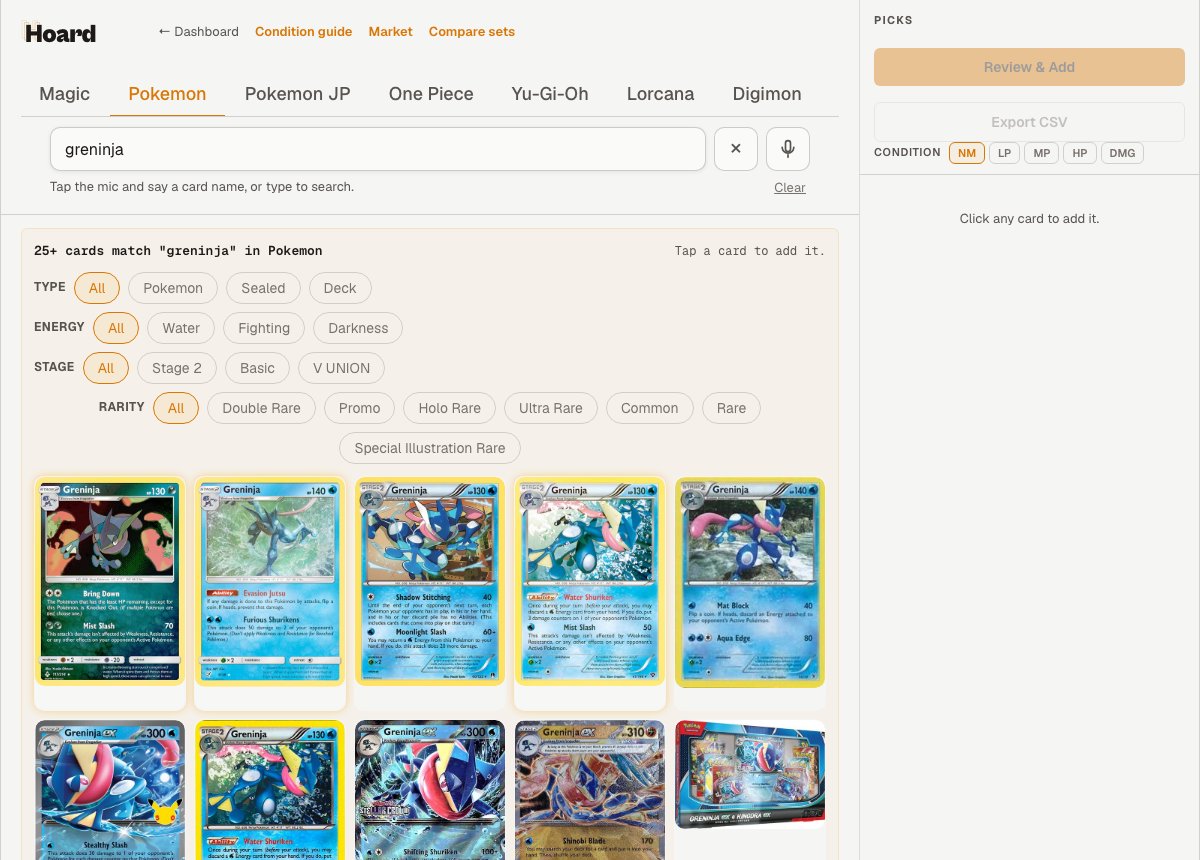
Searching a card by name in Quick Add used to show only the first handful of matches, with no easy way to tell near-identical printings apart. That’s fixed.- Search now runs across every set at once. Results page in, and a
Load morebutton walks through hundreds of printings, so nothing is out of reach. - Every result shows its collector number, so three different
Greninjacards are easy to tell apart at a glance. - Narrow a busy result with filter chips — game facets like
Type,Energy, andStage, plusRarityandVariant. Pick one and Hoard pulls in the rest of the matches, so the filter covers the whole result and not just the first page. The chips hide themselves when there is nothing to narrow.
Pokemon game. They live under the Pokemon JP tab, where they belong.
August 4, 2026
See what Hoard is watching, and why
Hoard already watches cards for you in the background — sealed stock, things you just sold or listed, cards with a pending price decision — so their market data stays fresh. Now you can actually see it.- The Cards tab’s
Listspopover has a newWatchingentry with a live count. Click it to jump straight to your watched cards. - Turn on the
Watchedfilter and a breakdown appears above your results, splitting the count by reason so you can tell “sealed in stock” apart from “you watched this yourself.”

- Every watched card carries a small eye icon wherever you browse it, and while the
Watchedfilter is on, cards with a temporary watch show right on the card when it lapses. Settings > Repricinghas a newMarket watchsection with the same breakdown, plus how many cards your plan can watch per category (this grows with your plan) and a link to upgrade if you’re bumping into it.
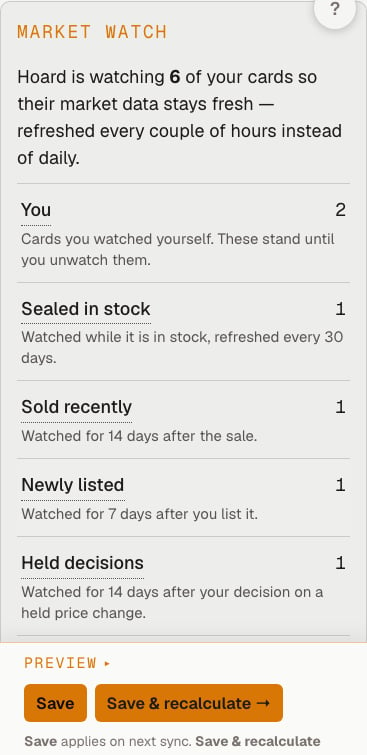
- Watch or stop watching a whole filtered set at once from
Filters > Watch results/Stop watching resultson the Cards tab.
Watchlist subtab to Saved, so it doesn’t share a word with market watch.
August 3, 2026
Build a card list on /collect without an account
Add Inventory now works while logged out. Browse by game or set, select cards (including with condition, foil/variant, and quantity), then you can download a ready-to-import CSV file and upload it straight to your store. No Hoard account required at any point.
Signed In users can sync their list to their store via their Hoard Agent, no CSV required.
AI Assistant pricing changes are safer to approve
- Approving a pricing rules change proposal applies it immediately. It used to depend on your assistant relaying a short-lived confirmation back to us, which sometimes didn’t happen. Now the click is the approval.
- Each proposal page lists the exact rule settings, scope, expected impact, and any protected-card warnings. Approve and reject still work if you close the tab and come back later.
- A dropped connection can’t create a duplicate approval. If your assistant loses the response mid-request, it recovers the original change set rather than proposing the same thing twice.
- A change set either lands completely or not at all, and records a checkpoint you can roll back to in case you don’t like the changes to your rules.
- Assistants can propose a whole matrix of rule changes for one approval, including creating and activating new rules. One click applies to the entire batch instead of approving or rejecting each change individually.
Emails no longer arrive twice
Sometimes Hoard was sending more than one digest email (ex: multiple weekly digests for the same day). Sorry about that. You can configure your preferences under Settings > Notifications.Market signals load reliably on large inventories
We’ve tuned how we compute various market signals that you can view in Hoard, so pages like Movers will load faster and with fresher data in the morning.Rule filter fixes
- Pricing rules using
is:borderless,is:showcase,is:extendedartoris:firstprintwere silently matching zero cards. They work now. - The rule builder’s
Specialdropdown now lists ten card treatments instead of only three. Promos, full art, textless andGame Changerare pickable without typing the query by hand. - The
Release Yearfield no longer visually clips the last digit. It shows the full four-digit year. - The Repriced Count link in the Sync History tab opens the exact cards which were repriced by a given sync. We fixed a bug that caused the list to be empty if it got too long.
Today tab
A little reorganization on the Today tab:Track RecordandPage-1 Presenceare now listed below Market Signals.- The bottom of the Today tab now carries a short list of recent product updates with a link to the full patch notes.
July 30, 2026
Case Study: Faster Fulfillment with Hoard Visual Pull
- New case study: measured results from switching to visual pull. We measured faster pulls, hours of staff time back per month, combined with fewer buyer refund complaints. Read more at www.tryhoard.com/case-studies/visual-pull.
Find things faster
There are a couple notable navigation changes within the app:- Quick Add is called Add Inventory now.
- Fulfillment is a top-level sidebar item, and in the mobile More menu. Your pull sheets are one tap away rather than buried under Sales. It carries a count of orders that are Ready to Ship, which is deliberately narrower than the Sales count (that one also includes orders still processing).
- The public-binder QR code in the top bar is now clickable. It opens your binder in a new tab, so you see what your buyers see.
- New Assistant shortcut in the sidebar, plus a rebuilt Assistants page built around one job: connect an assistant and let it handle your pricing rules. Pick Claude, ChatGPT or Codex, follow three steps with a one-tap copy for the connection link, then try a starter prompt. Try it out and let us know what you think!
Pull sheets
- Old Visual Pulls are viewable again through a read-only viewer - you can click on an old Pull and see the orders and photos of cards.
- Every card on the Visual Pull page shows its sale price, in both grid and table views. Pullers can spot the cards that need a toploader without checking twice.
- Tidier pull cards. The set symbol sits next to the set code on one line. The table scrolls sideways on narrow phones rather than pushing the page off-screen.
- The partial-refund banner is one tight amber line now, not a full-height block. Still obvious, no longer shoving cards down the page.
Add Inventory on mobile devices
We made the Add Inventory experience more mobile-friendly: tabs, filters, pips and sort tools all collapse behind a “Show Controls” bar, leaving the set picker and search. Tap “Hide Controls” once and it stays hidden so you have more room to scroll through cards. Additionally:- The “X versions” toggler has a full-width tap zone, which kills a common misclick
- Cards without alternate versions reserve the same footer height so rows stay aligned.
Billing
MCP usage is a chart now, rather than a stream of individual request rows. Requests are grouped hourly, with monthly unit, request and plan-allowance totals above a 30-day trend. This is intended to make it easier to visualize usage.Everything else
- Your store logo now shows up in the sidebar profile icon. To upload one, add your logo under Settings > Account. It falls back to email initials like before. This logo also shows up on your public QR code links.
- The Sync Now button is gone from the top toolbar. That button was a duplicate. Sync Now, Reprice Now and Preview Prices all live in the Agent bar popover. Simply click “Agent” and you can then click any of those actions to control your agent from the app.
July 28, 2026
Pricing rules
- Rules can set their own price floor. Every rule used to share one account-wide “never price below” amount. That meant a store splitting NM/LP from damaged bulk couldn’t give the beat-up cards a lower floor without dropping it for everything. Set a floor per rule in the rule editor, or leave it blank and keep your account default.
- Rules can target cards by language. Use
language:japanese(or the shortlang:jp), and-language:englishto catch all your non-English cards in one rule. There’s a Language dropdown next to Condition in the rule builder. Worth knowing: a plain condition rule likecond:LPalso sweeps up your foreign copies, so this is how you hold Japanese cards above market without touching the rest. - Rules can target exact price ranges. Min and max now take values directly, cents included, and above the slider’s $1,000 ceiling. Edit a rule built with an exact range and the numbers stay exact rather than snapping to slider steps.
- New
is:customfilter pulls up every manually-entered listing (playmats, bundles, cards not in the catalog) in one view. Combine it:is:custom price>20audits how the expensive ones are priced. - Reordering rules sticks. With more than a page of rules or a game filter active, a drag or the mobile arrows used to snap the row back. A move takes every time now, and only the rule you moved changes priority.
- Editing a rule’s percentage no longer fails with a “Slug must match” error. Rules carrying an older internal handle save normally.
Price decreases now push for everyone
A hidden account flag was blocking downward price changes even when “Never go down” was turned off. Stores that expected prices to track the market down never saw it happen, and there was no way to tell from the settings page. “Never go down” is now the one switch that controls decreases, whether you set it account-wide, per-rule or per-card. It works the way it reads. Every existing protection still applies: suspicious drops are held for your review, change caps limit any single move, big batches pause for approval.Integrations
Your TCGTracking shipper number and API key no longer get overwritten by your browser’s saved login autofill. Some browsers were filling those fields with your Hoard account email and a saved password.July 25, 2026
Pricing built for TCGplayer Direct sellers
- New price source: Highest of Direct / Market / Low. Pick it globally or per rule and each card prices off whichever is highest of TCGplayer Direct Low, Market, or the lowest listing without shipping. For Direct sellers the higher comp usually wins once fees come out. Cards without a Direct Low fall back to the higher of Market / Low on their own, and the bot-lowball guard still covers the low leg.
- New price source: Higher of Market / Low. Same idea, two legs. Global or per rule, same protection: a lowball listing far below market gets skipped rather than treated as the “low” side.
- Filter by Direct eligibility with
direct:.direct:yesfinds cards where TCGplayer reports a Direct Low price,direct:nofinds the rest. Works everywhere search does, pricing rules included. Price your Direct-eligible cards off Direct Low and let a lower-priority rule catch everything else. - Avoid the Direct fee gap. Prices landing between 3.24 cost more in Direct fees than they earn. Turn this on per rule and those prices go to $3.25. It applies to the final computed price, so a change cap or sale discount that would drop a card into that range gets bumped too. Off by default.
Pull sheets can follow your Direct box order
Turn on “TCGplayer Direct pull order” in Settings > Pricing and each pull sorts by set and card, foils last, rather than alphabetically. You pull a whole list in one pass. Newly released sets slot in on their own. The order is anchored to each set’s release date, so a set added to your catalog lands in the right place without waiting on a manual refresh, and nothing else in your order shifts when it does.Finish-correct prices everywhere
- Catalog reference prices no longer default to the foil price. The product-level price represents the non-foil printing now, so the Quick Add grid, the public price lookup and the “other printings” panel stop reading wildly high on cards printed in more than one finish. Foil-only cards are unaffected.
- Per-finish and per-condition prices fill in for cards nobody in your store holds. Quick Add, custom listings and the public price lookup pull from the full TCGplayer catalog, not just cards a seller has synced. Foil listings get a foil reference; non-foil gets non-foil.
- Custom listings price against the right finish. A manually-entered listing on a card that comes in both foil and non-foil gets a finish-correct starting price rather than sitting at $0 until you map it by hand. A plain non-foil no longer picks up a blended catalog price that could be far off. Where there’s no reliable per-finish price, it holds at your price instead of suggesting something wild.
Card detail panel, redesigned
- Every control shows what it does at a glance. Pricing behaviors, view switches, attribute filters and agent actions each got their own look. You scan the panel now rather than decoding it.
- Side-by-side compare uses the same status pills, filter chips and neutral controls as the rest of the panel, with both cards’ price history on one chart.
- The price history chart is clearer. Your price is a solid amber line, market data is dashed gray, and weekly sales volume sits in its own strip below.
July 24, 2026
Bug fixes
- Name collisions caused by renaming a rule or bookmarked search now shows a clear message instead of a generic error. The message tells you which existing rule already uses that name, so you can pick a different one or edit the existing rule directly.
- Order details with a duplicate line item no longer fail to import. An order with two lines for the same inventory item was previously rejected outright; those lines are now combined into one with the total quantity and price.
- Smart Actions refresh correctly for very large inventories instead of failing partway through.
- Returns > Pull Sheet: custom listing photos now appear as small thumbnails instead of full native size, which could previously fill the entire screen.
- Market drain signals now update correctly even when the latest seller count for a card is not yet known.
July 16, 2026
Digest emails, redesigned
We updated the layout for daily, weekly, and monthly digests. Each email opens with a quick “at a glance” table showing how you are tracking against your recent average, followed by a ranked “Needs your attention” list, your top sold cards, and the biggest market moves in your inventory. Stats are based on the time window since the last digest. Your “price changes” count now counts every adjustment made, matching the count on your dashboard. For example, a card repriced more than once counts each change (even if those changes inevitably cancelled out).- Settings descriptions updated. The digest page in Settings now matches the redesigned email format.
- Previous day’s sync shows up. If your most recent sync ran before midnight, the daily digest now shows those price changes instead of showing zero for the morning.
- Totals are complete. Order and price-change totals now cover the full window since your last digest, instead of occasionally leaving out recent activity.
Card image and flip improvements
- Dragon Ball Fusion World and Grand Archive now show their official card backs in the binder. Both previously showed the Hoard placeholder. Fusion World uses Bandai’s high-res official back; Grand Archive uses the GATCG API asset.
- Foil cards show the rainbow shimmer in table view. Holofoil, foil, and foil-etched variants now animate on the small art thumbnail in card table mode.
- Binder card flip works correctly on foil cards. A fast horizontal swipe on a foil card now shows a proper unified flip instead of the back face appearing while the front stayed in place.
- Etched foil Magic cards render correctly in Art Gallery mode. These variants now show as full-card tiles instead of a broken layout.
Auto-push approval fixes
Several approval issues were fixed together so your approvals stick the way you expect:- Approving sticks even if a sync is running. If your approval got skipped because a sync was in progress, it no longer drops silently. The push re-queues after the sync finishes and the banner clears once prices ship. The “Push price changes” button now also honors a prior approval instead of asking again.
- The “push approved” banner tells you when your desktop agent is offline, instead of promising prices will ship in about 30 seconds when they cannot.
- Approvals are scoped to the batch you saw. If the batch grows more than 25% before it ships, or the approval is older than 48 hours, the hold returns with the updated numbers.
- Switching to Watch Only mid-push is safer. An in-flight push can no longer export prices after Watch Only is set. Approving without the price-export permission now says so immediately instead of queueing work that never runs.
Price push no longer fails on TCGplayer staging outages
When TCGplayer stages your prices cleanly but then moves zero rows live with no per-row rejections, the agent now retries from a fresh session. If that still lands nothing, it falls back to the browser upload path. Previously these silent staging failures caused a hard fail with a misleading “TCGplayer reported validation errors” message and re-emailed you every sync cycle. Only a total no-op triggers the retry; partial results still commit the rows that went live.tcgmcp: foil prices and a printing browser
The free TCGMCP public MCP server gained two new capabilities:- Foil prices on card lookups. A card lookup now returns the real foil price alongside the regular price, instead of the cheapest option only.
- New
list_printingstool. Lists every set a card was printed in, with nonfoil and foil prices, border/frame/promo tags, and an affiliate-wrapped buy link for each. - Buy links now pin the exact printing you were quoted, across every game including Magic. Mass-entry cart lines carry TCGplayer’s own set code and product name. Magic codes are now matched directly by card, closing a gap that previously missed about a third of sets (promos, box sets, Secret Lair, The List, classic core sets, and crossovers). Where no reliable code exists, the line falls back to name-only.
- Buy links no longer error out on several games. The cart link’s product-line parameter now uses TCGplayer’s exact category names; previously some games opened a broken mass-entry page that rejected the whole list.
MCP fixes
hoard.inventory.getCard(tcgplayer_id)works again. The binding was decoding the response as a bare array, but the endpoint wraps cards in a paginated object. Every call was throwing an unmarshal error; it now decodes correctly. The returned card’s internalidis whathoard.pricing.testCardneeds, so a working getCard also resolves atcgplayer_idto that id.hoard.orders.listOrdersnow honors its documented header-only default. A plain call no longer embeds 20 line items per order (~40% of the payload). Pass{items:'full'}or{items_per_order:N}to include line items.
July 13, 2026
New: See whether your cards are on TCGplayer’s first page
“Today” view now shows how many of your recently-checked cards are on Page 1, along with any that dropped off recently. Open a card’s detail panel to see its own page-1 history over time, including when it was last seen there and when it was last checked. New search filters let you target these cards directly:is:page1 narrows to cards currently on the first page, and is:fell-off finds cards that recently dropped off.
Price history chart and “Compare reprints”
The card detail panel now shows a weekly price and sales volume chart going back up to 3 years for cards with enough history. A “Compare reprints” toggle overlays the price trends of other set printings of the same card alongside yours, so you can see at a glance whether a reprint affected the price.Three new games!
Sorcery: Contested Realm, hololive OFFICIAL CARD GAME, and Elestrals are now supported end to end. Catalog, search, rarity and condition filters, and game-specific attribute filters (element, cost, HP, bloom level, and more) all work for them.Dashboard track record
The dashboard now shows Hoard’s track record for sellers with price auditing on: real revenue from agent-set and rule-set prices over the last 30 days, your profit lift versus baseline prices, and your passive sales alongside, plus your top five wins with the sold price, the before price, and a “Why this price?” link into the pricing decision history. When Hoard held a price above the market low and the card still sold, the receipt shows the numbers.- Profit-lift chart. A daily chart shows your profit lift over the last 30 or 90 days, with a running-total toggle. The line shows flat before Hoard started setting your prices and grows from there.
- Real profit with purchase history. Once you have purchase cost data imported, any win where the cost is known shows the actual profit alongside profit lift. Sales below cost show as a loss rather than being hidden. Real profit and profit lift are reported separately.
- Emails now include the track record too. Your weekly and monthly digests now lead with the same summary: revenue, profit lift, passive sales, and up to three wins where Hoard held above the market low and the card still sold.
Orders sync much faster after a gap
After a sync gap, the agent now fills in shipping addresses and line items for your open Ready to Ship orders first, starting with the newest, before working through older history. Orders you need to print today no longer wait behind weeks of backlog. The agent also no longer waits a fixed half-second between every order. It starts fast and slows down only when TCGplayer asks it to, then recovers automatically. A multi-thousand-order backfill that used to take close to an hour now finishes in minutes.Game-specific card backs
Cards from games without a dedicated card back now show a Hoard-branded back instead of the Magic card back. Real official backs were added for Star Wars Unlimited, Flesh and Blood, Cardfight Vanguard, Weiss Schwarz, Union Arena, Digimon, Dragon Ball Super, Final Fantasy, Alpha Clash, and UniVersus.More games, more search filters
Digimon, Cardfight Vanguard, Gundam, Union Arena, and Pokemon (Japan) now support game-specific search filters: color, cost, level, power, grade, and more, the same way Pokemon and One Piece already work. Rarity sorting for these games now follows each game’s real rarity order instead of a generic one.QR code reuse on completed pulls
A finished pull’s QR code stays valid for two weeks. Re-scan it to see the pull’s cards for reference. The pull page also links directly from a past pull to the orders it contained.Email improvements
- Digest unsubscribe now works with Gmail and Yahoo one-click unsubscribe (List-Unsubscribe-Post / RFC 8058). The inbox button that removes you from a mailing list now works for Hoard digest emails.
- Sign-in and unsubscribe links are no longer triggered by inbox security scanners. Magic-link sign-in, the welcome email confirmation, and digest unsubscribe now show a one-click confirm page instead of acting the moment the link is opened, so a scanner prefetch cannot burn your sign-in link or silently unsubscribe you.
Fixes
- The dashboard now shows a notice when your plan has ended, with a Resubscribe link, instead of you discovering the lapse only when sync stops.
- A first sync against an empty store now explains itself. The empty state says the sync worked and found 0 listings, with a prompt to check whether the agent is on the right TCGplayer account.
- The payment-trouble banner now renders correctly on phones. Its styles were previously desktop-only.
- Discovery never shows an unpriced listing as $0.00. Listings without a known price now carry a null price, are excluded from the minimum price, and sort after priced sellers. The stock count and buy link still appear.
- Cards with special stat values (X cost, +1 modifier, 4000+ power) now show on the card and can be filtered. Some games’ cards were coming up blank for these values.
- Desktop auto-update no longer leaves the app broken if a relaunch fails. The update now confirms the new version actually started before shutting down the old one.
- The rarity filter label resets correctly when you change the product line. It was keeping the old rarity label even though the filter itself had cleared.
- Held price-decrease approvals stay scoped. Approving a few held price decreases no longer releases an entire held batch; only the approved cards ship.
- Cards without a recorded marketplace price count toward the safety guard thresholds, so a batch dominated by them cannot slip under the limits.
- A held batch that shrinks below your thresholds now clears its banner on the next sync instead of lingering.
- Onboarding game selection now works for all games. Answering the onboarding survey with Star Wars Unlimited, Weiss Schwarz, or other newer games no longer defaults you to Magic.
- A pricing rule scoped to an unrecognized game now shows that game name, not “All games”.
- Old reprice detail is archived clearly. Opening a reprice applied more than 30 days ago shows a plain “archived” state instead of an empty change list, so an old bookmarked link no longer looks like the reprice changed nothing.
- Decklist and Quick Add pricing no longer defaults to an expensive printing. Cards price at their cheapest tracked printing when no set is specified.
- Desktop: clicking Reconnect multiple times no longer opens a pile of browser tabs. A 2-minute cooldown prevents duplicate dashboard opens across agent restarts.
- Collect: each printing now shows its own price from the full catalog. Vintage cards with a 1st Edition and an Unlimited version price each printing separately, so the number no longer goes blank when you switch editions.
- Quick Add: cards TCGplayer rejects during publish no longer retry forever. A rejected card stops re-exporting automatically and shows a “failed to publish” action with a one-click retry from the Today tab.
- Quick Add: rejected cards show a “REJECTED” badge instead of “LISTING PENDING”, so it is clear they need attention.
- Desktop auto-update now actually finishes on Mac. It was silently redownloading the same update forever without switching over on a bare installation. In the rare case it still cannot relaunch itself, it now tells you the update is ready and prompts you to reopen.
- The Product Line dropdown in the Filters panel can now be opened. A leftover HTML attribute was keeping it from expanding when clicked.
- PirateShip exports no longer include orders with a missing address. Those rows were exporting with empty address columns and producing unmailable labels. The export confirmation now reports how many orders were exported, held for a missing address, or skipped.
- Settings toggle switches are easier to tap on a phone. The touch area now meets the 44px minimum without changing how the switches look.
July 6, 2026
Packing slips wait for the shipping address
A packing slip never prints with an empty Ship To block anymore. Orders arrive from TCGplayer in pieces: the order shows up first, and the shipping address and item list can land a little later. If you print slips during that window, any order whose address hasn’t arrived yet is held out of the printed stack, and the page tells you so (“1 slip held, shipping address still syncing”) instead of quietly printing fewer slips than you expected.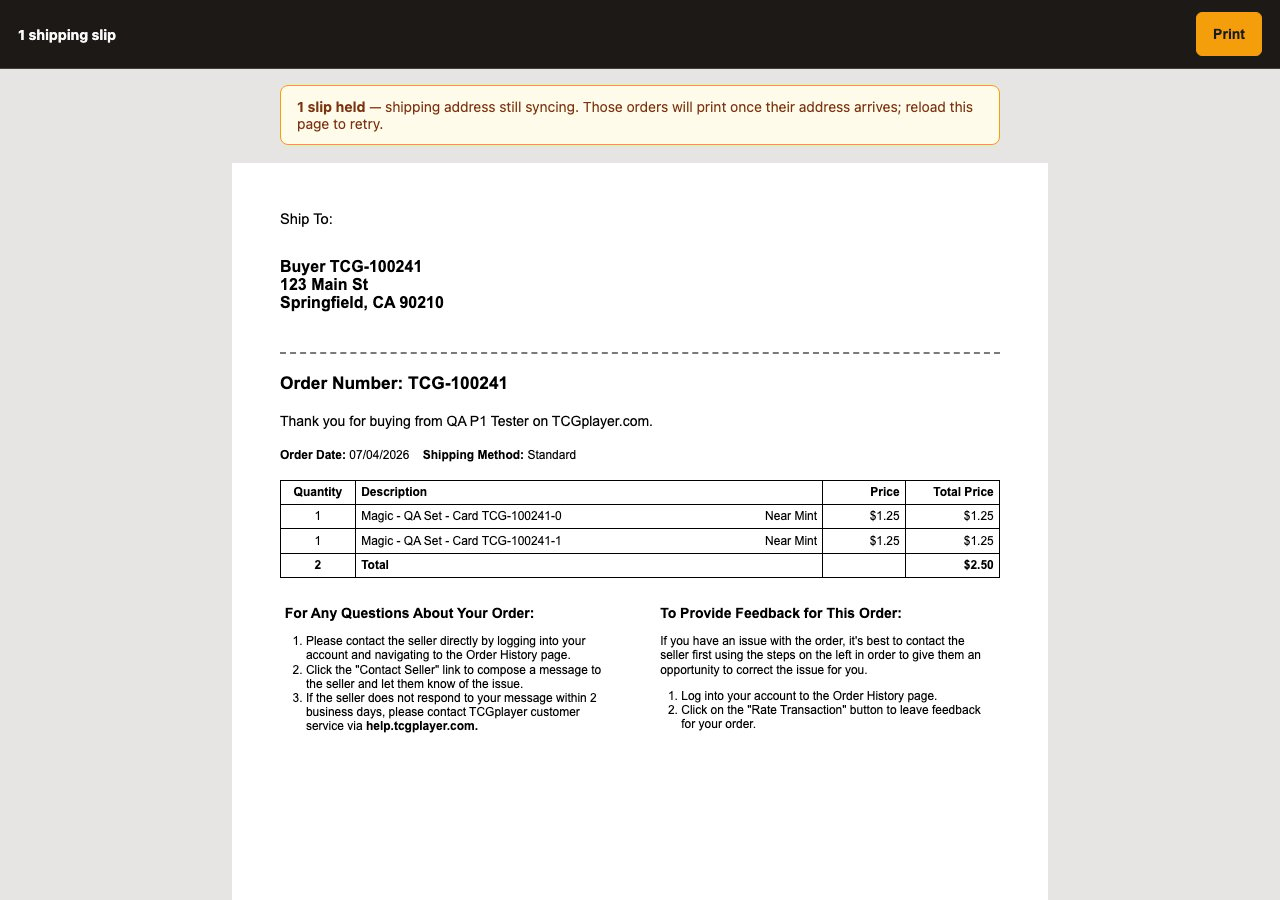
- City counts too. A slip with a street but no city can’t be mailed either, so those orders are held the same way. Orders from countries that don’t use a postal code still print normally.
- Nothing ready? The page says why. If every order in the batch is still waiting on its address, you see a plain explanation and a count of what’s held instead of a blank printout.
- Always on. There’s no setting for this one; it’s simply how slips print now. Held slips print on their own once the address lands.
New setting: hold orders out of pulls until fully synced
If you’d rather never start pulling an order that’s only half loaded, there’s a new toggle in Settings > Repricing, in the My Shipping Rules card: Hold orders until fully synced before print/pull. With it on, a new pull only captures orders whose shipping address and full item list have finished syncing. It’s off by default, so nothing changes until you turn it on. Held orders aren’t hidden. The pull sheet and the start-pull preview show “N ready · M held”, with one row per held order and the reason next to it: “no address” or “items still syncing (3 of 9)”.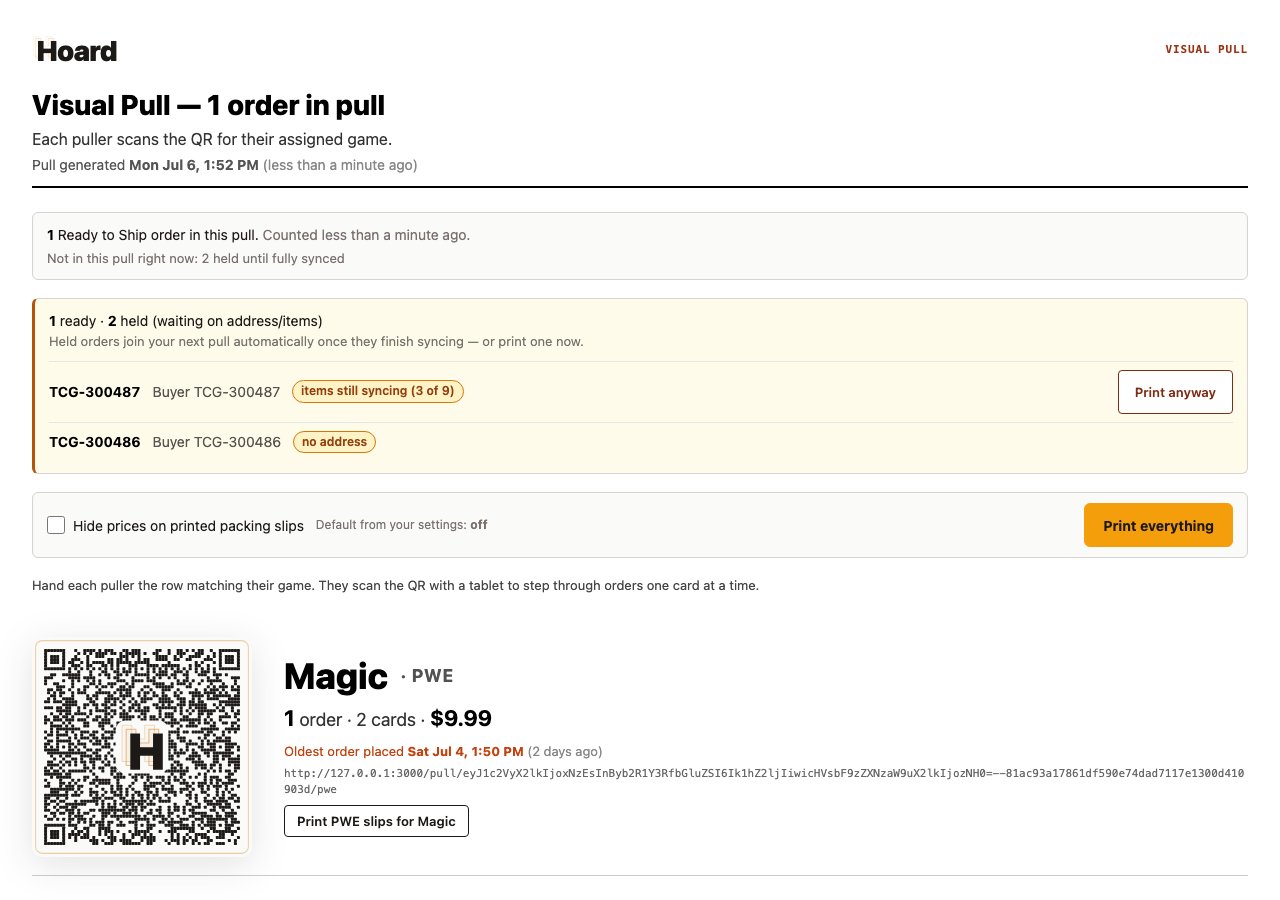
- Print anyway. An order that’s only waiting on items has a Print anyway button that adds it to the current pull on the spot, in case you know the missing items are on a slip you already have. Orders with no address can’t be forced; there’s nothing to print on the envelope until the address arrives.
- Held orders catch the next pull. You don’t have to do anything. An order that finishes syncing joins your next pull automatically.
The pull screen says what’s still loading
The “still syncing” notice on the pull screen now watches shipping addresses as well as items, and it names what you’re waiting on: items, addresses, or both. Before, it only knew about items, so an address-only wait looked like nothing was happening.June 24, 2026
Card detail panel redesign
The card detail panel has been reorganized to keep the pricing decision front and center, with the rest tucked behind a compact icon strip.- Pricing table, action, and “Why this price?” are always visible. The status table, repricing controls, and a “Why this price?” toggle (which now appears in the Target row and reveals the full pricing trace right below it) stay up top so you can act without scrolling.
- Details, Inventory, and QR sticker collapse to an icon strip. The three supporting sections each have their own icon. Clicking one opens it in place; the others close. Opening a section no longer causes a layout jump.
- Source links now live beside the price they verify. Your current price links to your live TCGplayer listing. The source row links to the TCGplayer catalog page. PriceCharting links to PriceCharting. They used to all stack at the foot of the panel.
- Clicking a card name in the table now opens its detail panel. The set name beside it stays a filter link. Both also work in compare mode.
- The Gap row is gone; Upside stays. The price table is cleaner: Gap was confusing (negative gap when you’re above market isn’t a problem). Upside shows what you’d gain by accepting the suggested target.
- Cards without art get a placeholder instead of a blank box. A quiet card-shaped placeholder shows the card name, set, and “No image” in both single and compare views.
- Dark-mode fixes. The source verify link no longer collides with the source price, and the “set up consignors” hint in the Owner row is legible again.
- Cards table hover fix. Hovering a source price no longer shifts column widths; the source label fades in at reserved space.
Price trend chart
The price trend section now shows a full 90-day chart in the card detail panel.- My price vs. market on one chart. Your listed price history (amber line, gradient fill) and the TCGplayer market or low price (dashed reference line) on shared axes, with three y-axis gridlines and monthly x-axis marks.
- Market / Low toggle. When both series are available, pill buttons above the chart let you switch the reference line between market price and low listing price. The in-chart label updates to match.
- Comparison chart. With two cards selected in A/B compare mode, a combined chart shows both cards’ price histories — Card A in amber, Card B in blue.
Why this price?
- Step-by-step pricing trace in the detail panel. The Target row in the price table now has a “Why this price?” toggle that reveals the full pricing breakdown for that card: price source, markup, floors, shipping adder, velocity nudge, change caps, and final price. Loads on demand when you open a card.
Performance
- Reprice preview loads instantly even for large inventories. The first page of results appears right away, with more loaded only when you ask for them. This removes a stall that could slow the site during a big reprice.
- PriceCharting evidence no longer fetches for cards that don’t need it. The reprice preview and sync no longer pull grade data for cards outside the held subset, cutting unnecessary database work.
- Generating a reprice preview is faster when a PriceCharting rule is active. Inventory and evidence data now load columns directly instead of building a full object per row — roughly 8x faster for the evidence load, 3x faster for the inventory load on mid-size collections.
Fixes
- Custom (photo) listings are never auto-lowered. A graded slab or hand-photographed card used to be repriced down to the raw market price. Now any price drop on a custom listing is held for your review, so a PSA slab isn’t dragged to raw market.
- Daily Digest now reports your whole day. Sales and additions are summed across every sync that ran that day. Before, the digest read only the most recent sync per game, so sellers who sync often saw a near-empty digest even after a busy day.
- Price Changes / net impact is exact even after rule changes mid-day. The repriced count and net dollar impact come from the price-change ledger, which records every push as a from→to step. Swinging a card up and down across many rule edits nets out correctly.
- No more double digest on weekly day. If both daily and weekly digests are on, the day the weekly goes out no longer also sends a daily.
- Custom (photo) listing reprices appear in the digest again. Auto-priced photo listings now count toward digest Price Changes and net impact like any other card.
- Packing slips: long card names (YuGiOh, etc.) no longer bleed across page breaks. Rows with names over 58 characters render at a smaller font and the paginator now estimates wrapped line counts correctly.
Changed
- Hoard icon in the Claude connector adapts to dark and light mode. The H glyph renders white on dark backgrounds and dark on light backgrounds.
June 17, 2026
Sign in with Google or Discord
The sign-in page and the waitlist form now let you continue with the accounts you already have, no Hoard password to remember. Sign in with Google or Discord and we never see your password, that handoff stays between you and them.- Continue with Google and Continue with Discord buttons. Both now carry the official Google and Discord logos, so the buttons look the way “sign in with” buttons look everywhere else: a white button with Google’s four-color G, and a blurple Discord button. If you already have an account with that provider connected, the button signs you straight in. If you’re new, it puts you on the beta waitlist with your email already verified, a faster, pre-verified way onto the list while signups are invite-only.
- A tidier sign-in page. The sign-in card is cleaned up around the new buttons, with a clear “or” divider between continuing with Google or Discord and the usual email, password, and magic-link options.
June 13, 2026
Reusable QR stickers you can move from card to card
QR price stickers now come in a reusable flavor. Alongside the stickers you print from your own inventory (each one bound to a single card for good), there are blank claimable stickers you scan, claim to your account, and assign to a card yourself.- Claim a blank sticker and assign it to a card. Scan a blank code, claim it, then pick the card from a list-scoped picker right on your phone. From there it works like any sticker: the scan shows the live comp, the haggle dial, and your privacy settings.
- Reuse it when the card sells. When the assigned card is gone, tap Card gone? Reuse this sticker on the sticker’s page. That unsticks the code so you can put it on the next card. It’s one deliberate move, never a silent swap, and in the gap a scanner sees your private wall, never the old card.
- Turn a sticker off. Deactivate this sticker stops every future scan from showing that card, for when you’re done with a code for good. Reuse and deactivate are for blank claimed codes only, never for the stickers you printed from your inventory.
Every scanned code now lands somewhere live
A scan never dead-ends on an error page anymore. If a card has sold through, a code was turned off, or the code isn’t one we recognize, the scan lands on a friendly live Hoard page instead, telling the scanner what happened and pointing them to Hoard.Print sheets of your active cards or a filtered list
Printing a sheet now covers exactly the cards you want: open the print sheet from Settings to get your whole active inventory, or from the Cards tab Export panel after filtering to print just that selection, in display order. Choose the standard 48-per-sheet 1-inch labels (Avery, Online-Labels, Dymo 30332) or switch to the Cricut print-then-cut sheet with a one-click PNG (300 DPI) or SVG download. Both end with a manifest page so you can match codes to cards by hand.New side navigation
The dashboard now has a collapsible navigation rail on the left, with sections for Today, Cards, Movers, Buy List, Sales, and Consignors. Click the arrow at the top to collapse it to icons only; your preference saves across sessions. On mobile the existing tab bar works the same. Also in this pass: Today opens with your stat cards above the Needs Attention list, the sync summary shows the 7-day cumulative repricing impact alongside the single-session number, and Pulls has a cleaner layout with a prominent Start Pull button and the date range behind an optional toggle.Price locks now receive raise suggestions
Locking a card’s price means “don’t auto-discount,” not “ignore the market.” Locked cards now surface suggestions to raise when they’re priced meaningfully below market. Accepting a raise applies it and keeps the card locked at the new number. Suggestions to lower a locked card are still held back.Price suggestions expire faster and check the market before applying
Price-sensitive suggestions, raises and demand pulses, now expire after 48 hours instead of 7 days, so you’re acting on recent data. Before a raise applies, Hoard checks whether the market has moved more than 5% since the suggestion was generated; if it has, the apply is blocked and you’ll see a notice. Depth-based raises are exempt, since those are intentionally priced above market.is:stickered filter
is:stickered in card search finds every card with an active QR sticker, whether a printed sticker from your inventory or an assigned blank code. Combine it with other filters: is:stickered is:gone shows stickered cards that have since sold (peel candidates), and is:stickered list:con-box narrows to a saved list.
Fixes and polish
- Shipping slips on Windows: Chrome and Edge now suggest a filename when saving a shipping slip as a PDF, instead of leaving the field blank.
- Sales Today: Clicking the Sales Today stat opens the Sales tab with the Today period already selected.
- Sync log: The repriced count now links to the cards that were actually repriced.
- Nav order: Sales now appears before Buy List in the side rail and mobile tab bar.
- QR sticker assign page: The list filter is now a dropdown instead of a row of chips, fixing overflow on accounts with many lists.
June 12, 2026
QR price stickers: scan a card to quote a live price
Print a tiny QR sticker once per card, stick it on the toploader or slab, and the price lives on the page the QR opens, never on the sticker. Scan one and you get a mobile page with the current market, source links, and a haggle dial you can quote off in person. Reprice all you want; the sticker never changes and the scanned page is always current. It’s the in-person counterpart to the public binder.- Print from two places. Start a sheet at Settings → Public binder → “QR price stickers” → Open print sheet for your whole inventory, or from the Cards tab Export panel to print just the cards you’ve filtered to. Cap of about 200 labels per run. Both sheets end with a manifest page so you can match a stack of toploaders by hand.
- A haggle dial that hides your ask. The scan page leads with a public market number and an adjustable percentage (25% to 200%). Quote “85% of market” by stepping the dial, no math and no exposing your own listing price. Tap any comp (TCGplayer Market, Low, Direct Low, PriceCharting ungraded, or a PSA/BGS grade row) to re-base the dial on it.
- Source links that land on the right card. “View on TCGplayer” opens the exact resolved product and variant instead of a search you’d have to dig through, and “View on PriceCharting” carries the variant so you land on the right loose-card page.
- Private by default, with a per-card override. Stickers are off until you flip Public stickers under Settings → Public binder; a non-owner scanning a private card hits a sign-in wall. A Default / Public / Private control on each card’s detail panel lets you open one chase card while the rest stay dark. Scan pages are never indexed by search engines. When you scan your own sticker while signed in, you also see a private “Your Hoard ask” line a buyer never sees.
Cricut print-then-cut style for sticker sheets
If you cut your own stickers, the print sheet now has a Cricut style alongside the standard 48-per-sheet 1-inch labels.- One-click 300 DPI download. The Cricut sheet lays out an 8×8 grid matched to a print-then-cut template, with a Download PNG (300 DPI) button (or Download SVG). Upload one image to Design Space instead of placing 64 codes by hand. Switch between styles with the toolbar link on either sheet.
Card lists: hand-picked sets you can search and price as a group
Lists are the explicit-membership sibling of bookmarks. A bookmark is a saved search that re-runs and shifts as your inventory changes; a list is the exact cards you chose by hand and stays that way. Think of a list as a shoebox: the box going to a show, the cards you want gone this week, a deck you’re keeping together, a grading submission. If a card sells, it stays on the list so you can still find it.- New Lists button in the Cards toolbar. It’s the layers icon, next to the bookmark button. Click it to create lists and pull them up — each list is a chip that filters the table to its cards.
- Add cards three ways. Drop a single card on a list from its detail panel, add a whole filtered set at once with Add results to a list in the Export panel, or, right after a Quick Add publish, send the batch you just published straight onto a list.
- Search a list with
list:. Typelist:con-box(orlist:"Con Box") to filter to a list’s members, and combine it with anything else, likelist:con-box price>20. Addis:goneto see what’s left the list — the cards that have since sold or delisted, hidden from the normal view. - Price a whole list. Point a pricing rule at
list:<slug>and every card on the list gets priced by that rule. List rules can skip the game scope other rules need, since a list is already a specific set you picked, and adding or removing a card re-prices it right away instead of waiting for the next sync.
A ghost on the Audit button
The Audit button now carries a small ghost icon, marking it as the place to find the cards that have gone quiet — sold-through or delisted listings that slipped off your active inventory.June 11, 2026
Watch a card, and Hoard watches it for you
Open any card and hit Watch to get fresh market data on it every couple of hours. Good for banlist watches, spec boxes, and anything you’d otherwise set a high price on and forget. Hoard also auto-watches your sealed product, anything you’ve sold in the last two weeks, and anything you’ve listed in the last week, so the cards that matter to you stay current without setup. Searchis:watched on the Cards tab to see everything currently watched, manual and auto. A Watched filter chip in the Cards toolbar sits next to Price Locked as a shortcut.
Behind the scenes, cheap cards with no sales get checked weekly instead of daily, freeing capacity for the cards being watched.
Movers now flag market depth at a glance
Top movers carry a BOUGHT OUT · 2H AGO badge when buyers just cleared a card’s listings, and a listing count like 2 LISTED when too few copies are for sale for the lowest price to mean much. The hero card carries the badge too.Today: buy-out and pricing-power actions
When a bought-out card’s price change gets held, Today shows a one-tap action: raise to what it actually sells for, or match what the remaining sellers ask, with both numbers explained. The price locks so the next sync can’t drag it back down. A new Pricing power suggestion fires when a card sells fast in a thin market and your page-1 listing sits a material gap below the next one. One tap raises you to just under that rung, capped to the sales median, with the evidence shown: sold last 30 days, listings in your condition, and the exact gap.Repricing now protects thin-market and bought-out cards
A large proposed move on a low-value card (more than 30% on a sub-$3 card) gets held when the market is too thin to trust TCGplayer Low (fewer than 5 listings in your condition), or when an active buy-out is detected. The preview still shows the proposed move, but the commit holds it and surfaces conservative or aggressive options instead. Why this price? now explains held moves with a one-line “Price change held” note and the reason.Mute a card from automated repricing
Cards can be muted from the detail panel’s Follow Market / Mute quick-set. A muted card is skipped by the reprice commit, like a price-locked card, but without pinning a specific price. Useful when you want to hold a card while the rest of your inventory keeps following the market. The detail panel also gains a Check market depth button that queues a live listings-and-sales fetch on demand.Foil, normal, and language are tracked separately
Market data now keys each finish and language as its own card. TCGplayer shares one product id across finishes, but they have different prices, velocity, and listing depth, so foil data never lands in a normal card’s record, or vice versa.Sales tab: independent period pills
Every Sales subtab (Overview, Orders, Customers, Pulls, Returns) now carries the same 7d / 30d / 90d / 6mo / 1y / 2y pill set and remembers its own selection. The Overview KPI strip trend and fee-rate delta reflect the chosen period, the Customers tab filters by it, and the Pulls history is paginated 20 per page. Free-plan accounts are capped at 90 days of history on the financial subtabs. The 2y pill is pro-only.Pulls and shipping
- The pull sheet and the printed slips now always agree. Orders that shared a placed-at timestamp could land in a different order on each load, so a puller would see a QR code that started right and then “fixed itself.” Pull order is fully deterministic now.
- Expedited orders correctly land in the Tracked queue, including verbose labels like “Expedited (4 days)”. Every surface, the pull queue, Orders tab filters and badges, sales report buckets, and the PirateShip export, matches the leading word. Analytics shift slightly: orders that had been mis-bucketed now read as Expedited.
- Expedited is recognized straight from a bulk sync. Routing holds from the first sync, even before the shipping export lands.
- A re-sync no longer rolls back an order’s hydrated purchase time. Once order-detail enrichment records the exact placed time, background syncs leave it alone, so same-day orders keep their distinct order.
- A warning before starting a pull while one is already active, so an accidental click can’t close a pull mid-pack.
Returns
- Pull sheet now includes every card from a fully-refunded order. TCGplayer sends no per-line breakdown on a full refund, so those orders had been dropped from the audit list entirely.
- Qty reflects the copies actually refunded, not the full line quantity. Refunding 1 of 2 identical cards reads 1.
- Each row links back to its order on TCGplayer. The CSV export carries the order number.
- The Returns pull-sheet tab no longer scrolls to top on click.
QR labels print the current Cards view
QR label sheets now sticker exactly the cards on your current Cards view, in the order shown, including on first load before you search or sort. Long runs paginate into numbered letter sheets, the manifest starts on its own page, and each manifest row points to the sheet its sticker prints on.MCP: full refund picture on orders
An assistant reading your store over MCP now sees the refunded dollars, the refund reason, and the refund note onhoard.orders.listOrders, alongside the existing refund type and origin. A missing refund amount reads as “not refunded”, distinct from a $0 refund.
Buyer-written text (refund reasons, refund notes, the onboarding-survey wish field) is length-capped and stripped of hidden control or zero-width characters on the MCP read surface. Your dashboard shows the original text unchanged.
Smaller fixes and tweaks
- Resolving an unmatched Quick Add card by hand no longer gets wiped when you add or edit another line. The “did you mean” picks survive a re-lookup.
- Custom and photo listings that match a catalog product now get that product’s market price during sync, instead of staying at $0. Pokemon custom listings continue to price from PriceCharting.
- Pricing rule preview is much lighter on large inventories. A narrow rule’s preview scopes (or skips) the sales-velocity scan and resolves rules once per preview, and the full repricing preview lets the database pick each card’s winning rule and return one row per card, instead of pulling every match into memory.
- Movers rollup deploy now succeeds. A migration backfills existing rows before rebuilding the unique index, so a card with both foil and non-foil rollup rows no longer fails the index swap.
Waitlist re-engagement
Waitlist entries that stall at any funnel stage now get a 5-step email series at day 3, 10, 18, 30, and 60, including unverified entries. Each email carries a signed resume link that drops the recipient back into the funnel at the right step. One-click unsubscribe, and per-entry manual nudge from the waitlist admin panel.June 9, 2026
Expedited PWE orders are now in the Tracked queue
Expedited PWE orders are often shipped with tracking, so we are combining them with the other tracked orders in the tracked queue. Previously, they were put in the plain-envelope (PWE) pile. Scanning the tracking QR code properly starts at the first order in the list. Meanwhile, if you re-scan a QR code while partway through that Pull, it takes you to where you left off.Packing slips now show refunded items, struck through
When you print a packing slip for an order that was partially refunded, the cards that came off the order now print with a line through them and a “Refunded” tag, so the buyer can see exactly what changed. If a line’s quantity was cut, say 2 down to 1, the slip shows the original count struck out next to what’s actually shipping. The old packer-only note (“1 refunded line removed from this slip, pack only the cards below”) is gone, since this slip goes to the customer.The pull wrapup page renders with its full styling
Opening a past pull from your history used to show a bare, unstyled page. It now carries its stat cards, per-game table, and layout, down to mobile widths.Marking an order shipped shows up right away
When you mark an order Shipped, its row now flips to a Pushing to TCGplayer state the moment you click, instead of sitting on Ready to Ship until your next sync. Once TCGplayer confirms on the next order sync, the row settles into Shipped, and if the push didn’t go through, it goes back to where it was rather than pretending it shipped. A new Pushing to TCGplayer filter in the orders toolbar shows which orders are still in flight.The “Orders need details” badge empties on its own
While orders are still filling in their details, the badge updates itself every few seconds, so you can watch the count drain to zero instead of reloading the page to find out it already finished. It stops once everything’s caught up, pauses while the tab is in the background, and quiets down after a few minutes if you leave a tab open with nothing happening. Reopening the tab or clicking the badge starts it watching again. This pairs with order details now filling in on a quiet background pass, which often finishes when you’re nowhere near the pull screen.Repeat Refunders is its own tab now
Repeat Refunders moved out from under the refund table into its own full-width tab, next to Orders and Pull Sheet. It lists every buyer who’s refunded you more than once, with how many times they’ve done it, how many orders they’ve placed, and their refund rate, so a serial refunder can’t hide in your order history. Buyer-requested refunds and the ones TCGplayer ruled against you are counted separately, and seller-side cancellations are left out, so the list reflects the buyer, not your own housekeeping.A cleaner Returns tab
A few fixes to make Returns easier to work in. Switching away from Returns no longer leaves the returns view stacked behind whatever tab you opened next. You can open a refund’s line items right from the Returns tab by clicking the row, instead of having to pass through Pull Sheet first. Long order numbers stay on one line, the header row stops wrapping, and the Total column lines up with the rest.Quick Add keeps your price filter, and sorts by value
A handful of Quick Add improvements. Set a price floor like $5+ and it now carries into the next set you open, instead of resetting to All prices every time (as long as that set has cards at your floor). A new Value layout sorts a set by price, high to low, so your most valuable cards come up first. The active set name no longer gets crowded by the jump-to-neighbor buttons, which are compact icons now that show the set name on hover. And sealed product now gets its own Sealed & Product section, so booster boxes, bundles, and decks no longer land under Colorless with the singles.Sync and notification fixes
- Sync-complete notifications work again. The browser notification when a sync finishes, and the welcome moment on your first sync, had been silently broken since a March change. They’re wired back up.
- “Refresh returns” and “Refresh orders” no longer warn that your agent stopped responding. Those syncs were finishing fine, but the status check watched the wrong clock and would wait three minutes before warning you for nothing. It now tracks each sync’s own completion and clears the moment the work is done.
- The “still waiting on your agent” message is a proper banner now, with clear Try again and Setup guide buttons instead of a stray line of text. The “enable notifications” prompt got the same treatment.
June 8, 2026 — Quick Add cards now show when they’re not listed, with a Publish button right there
Cards you added with Quick Add used to show a green “ON TARGET” badge at $0.00 — so they looked done, even though they were never listed on TCGplayer. They’d sit unlisted while their value climbed, with the only way to publish buried on another page. Now a card that hasn’t been listed shows a clear NOT LISTED badge, and a Publish button appears right on the Cards toolbar. Click it and your Quick Add cards go live on your next sync. If a card can’t be listed yet because we don’t have a TCGplayer match for it, we tell you that instead of failing quietly.June 6, 2026
Set orders aside so they stop cluttering your pulls
You can now tell Hoard an order is handled and keep it out of your pulls. Select orders in Sales → Orders and hit Exclude from pulls — handy when you fulfilled them outside Hoard. Excluded orders drop out of your “to pack” count and never get pulled into a future pull. Changed your mind? Re-include puts them right back, and a new Excluded from pulls filter shows everything you’ve set aside. It also cleans up on its own. When Hoard backfills your TCGplayer order history, anything older than two weeks is set aside automatically, so a fresh account starts with a clean, recent working set instead of years of shipped orders — and existing accounts get the same one-time cleanup. Excluded orders show dimmed in the list with an “Excluded from pulls” tag, so a glance tells you what’s done versus what still needs packing. Excluding and pulling stay in sync: excluding an order takes it out of any pull it’s in, and adding an order to a pull un-excludes it. And it works on your phone now — the orders cards have a tappable checkbox so you can exclude, re-include, and pull in bulk from mobile.See how a pull went with the new wrapup page
Click any past pull in the Pulls history to open a wrapup: orders done, cards picked, queues completed, total pick time, and a per-game breakdown with throughput, deferred orders, warnings, and flagged card images. It separates the picking clock from shipping status, so you can see where a pull slowed down and spot bottlenecks across games — without touching anything’s shipped state.June 5, 2026
The company behind Hoard is named on our legal pages
The footer, Terms of Service, and Privacy Policy now name Hoard Technologies, Inc. (a Delaware corporation) as the company that operates Hoard, so it’s clear who you’re agreeing to terms with and who stands behind the service. Nothing about the product changes, and you’ll still see it as just “Hoard” everywhere you use it.New sellers land on agent setup, not an empty dashboard
When you move a seller off the waitlist, the link in their welcome email now takes them straight to agent setup — the download and the install steps — instead of dropping them on a dashboard with no clear next move. They stay pointed at setup until their agent actually connects. And the agent status button now shows a clear “Download the agent” button any time the agent has never connected, on both desktop and mobile, so the way to get running is never hidden.Delete a pricing rule, and expired sales stop looking “on”
You can now delete a pricing rule. Every rule on the Card Group Rules page has a Delete button, including expired sales, which until now had no off switch you could reach, so there was no way to clear them out. Deleting asks first and tells you exactly what happens: the cards that rule covered fall back to your next matching rule or your default pricing, and your live TCGplayer prices don’t move until your next reprice or sync. Edit is on every rule now, too. Before, you had to know to click the rule’s name to edit it. The button is just there. And an expired sale no longer looks like it’s still running. Its on/off switch used to glow green like an active rule until a background job caught up, which read as “stuck on” right next to the EXPIRED tag. Now it shows as a locked, greyed-out switch the moment the sale lapses, so it’s clear the rule isn’t pricing anything. Edit re-arms it with a new duration, or Delete removes it.June 4, 2026
A batch of visual pull fixes
You can now see what an order is worth while you pull it. The total sits right on the card in front of you, and on the printed cover sheet. Conditions group the way you’d expect now, on every game. Yu-Gi-Oh and Pokemon cards that carry an edition or printing, like “Near Mint 1st Edition” or “Near Mint Reverse Holofoil”, used to land scattered through an order. Now the Near Mint cards sit together, then Lightly Played, then the rest, so you walk a shelf once.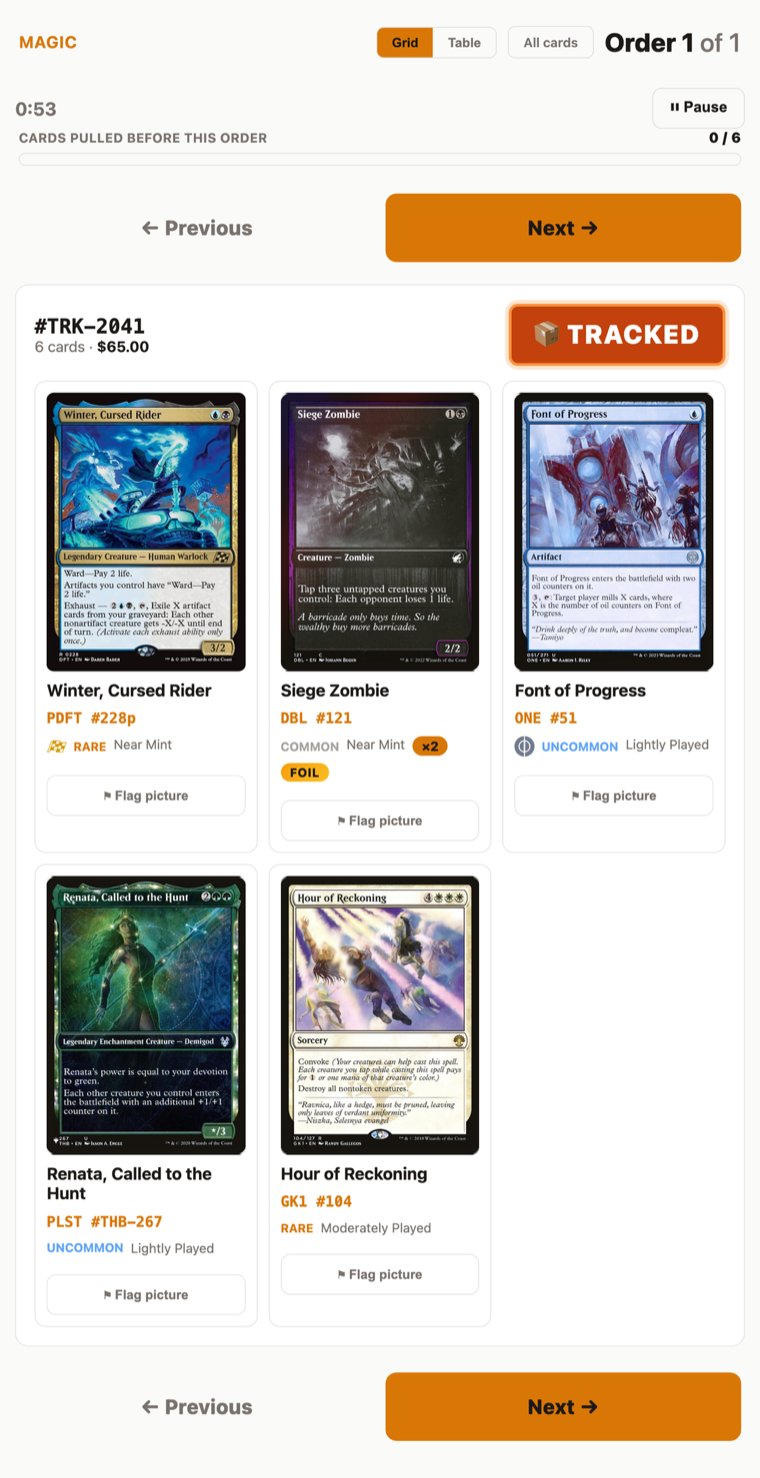
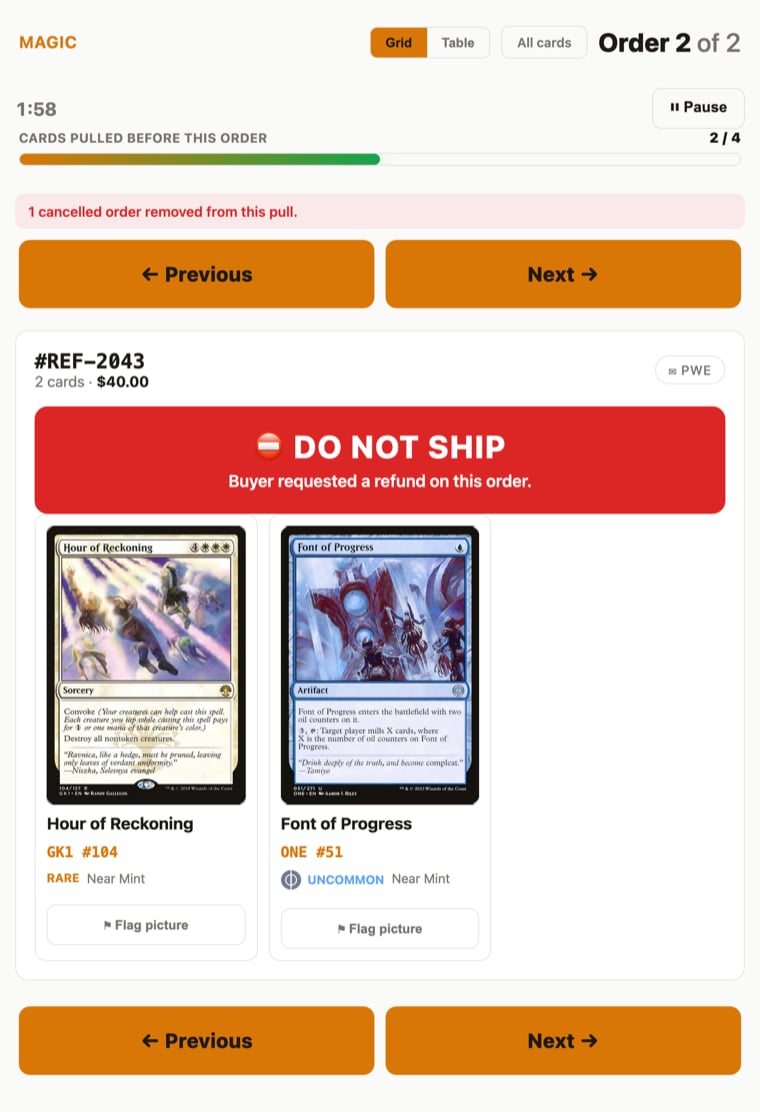
One Piece pulls walk your sets in order
If you pull One Piece, your cards now group by set in the order you actually walk your boxes. Main sets (OP01, OP02 and up) come first, then extra boosters (EB), premium boosters (PRB), promos, and starter decks (ST) last, with each set in collector-number order. You visit each box once instead of bouncing between shelves. The on-screen pull view and the printed packing slip match, so the tablet and the paper agree.June 3, 2026
Settle a price question right from the order
When a buyer asks why a card sold for what it did, you can now answer it from the order itself. Open the order, expand the line item, and tap Why this price? A window opens with that card’s full price history, and the change that set the price it actually sold at is flagged for you. For any change your rules engine made, you can open it to see the step-by-step reasoning behind the number, including the market figures it was working with that day. If a price was set by hand or brought in through an import, the window says so plainly instead of guessing. The whole thing works on your phone, so you can settle a question from anywhere.”Update Prices” is now “Preview Prices”

Refresh orders on demand, and a sync history you can trust
The Orders and Returns tabs each have a Refresh button now, so when an order’s amount, line items, or shipping address looks out of date you can pull the latest from TCGplayer right then instead of waiting for the next scheduled sync. Clicking Sync Now, Reprice Now, or Refresh also shows a banner the moment you click, so you know the request registered, and the activity log updates in place when it finishes instead of making you reload. And the sync history itself reads honestly now: it shows every step of a sync, says plainly when a step succeeded after a retry, and clearly flags a sync that failed, ran only partway, or was halted before prices were applied, so you can tell at a glance whether your data is current. Cycles where nothing needed to change are labeled as such instead of looking like an error.Your sales reports now follow your time zone
An order placed late in the evening could land on the next day in your reports, so a 10pm sale showed up as tomorrow’s. Your Customers list, the Today / 24h / this-week / this-month sales cards, the orders timeline, and your daily and weekly emails now use your own time zone, so an order counts on the day it happened where you are. Set your time zone under Settings → Account.Help for talking to your store from an AI assistant
You can ask your store questions in plain English from Claude, ChatGPT, or Codex, like “what sold best last week?” or “which cards are underpriced?” Reading your store is read-only by default, so you can try it on real numbers before you ever let it change a price. Settings → Assistants opens with a short plain-English intro and a ”?” help bubble that links straight to the new guides, so you don’t have to leave the page to figure out what connecting an assistant actually does. Three new help-center pages back it up:- Talk to your store is the safe quick start. It walks you through connecting one assistant and asking read-only questions first, where nothing can change, before you decide whether to let it make edits.
- AI assistant FAQ answers the questions sellers actually ask: is it safe, what does it cost, and do I need my home computer on (you don’t).
- Common setup issues covers the snags people hit most, like a blocked sign-in window or an assistant that says it can’t see your store.
June 2, 2026
Your first session already knows how you sell
If you told us about your store in the waitlist survey, the setup wizard now arrives with the matching answer already filled in (for example, the “cards sitting around too long?” step), clearly marked so you can change it in one tap. Nothing is skipped or locked. And when you flagged a specific pain, the dashboard opens the Today tab with one real number from your own inventory (“you mentioned cards sitting too long, here are 47 of them worth $312”) plus a one-tap way to act on it. If your inventory doesn’t back it up, you just get the normal dashboard. Dismiss the note and it stays gone until something meaningfully changes.A faster dashboard on your phone
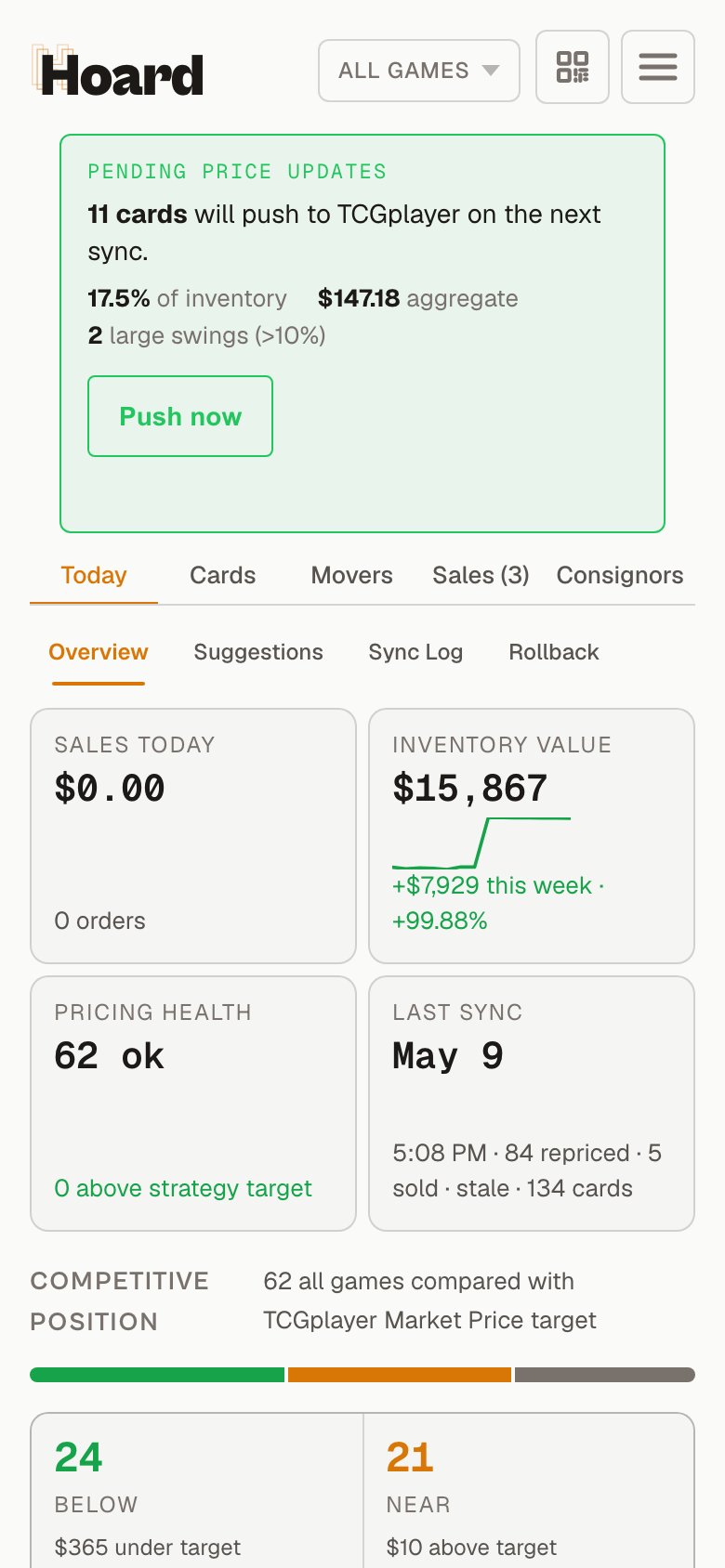
Card search reads both sides of double-faced cards
Searching card text witho:, fo:, or fulloracle: now matches double-faced cards by the text on their back face too, not just the front. A search for a phrase that only appears on the transformed side used to quietly miss the card. Now it finds it, matching how Scryfall searches across all faces.
Pick lists populate reliably for high-volume stores
If you move a lot of orders, your pull sheet would sometimes come up short during a sync, with some orders quietly missing from the pick list. Big order batches are now broken into smaller pieces as they import, so the full list comes through every cycle. And if a batch comes back looking incomplete, Hoard now stops and rebuilds the pull sheet the safe way instead of handing you a partial one.June 1, 2026 — Your store URL saves even when it isn’t a perfect link
The Public store URL field on Settings → Account used to reject anything that wasn’t a fullhttps:// address, so pasting a bare domain like shop.tcgplayer.com would bounce. Now Hoard accepts the shorthand and tidies it into a working link for you. You only get stopped if the address looks unsafe, and the field no longer fights you in the browser when you type a plain domain.
← Older updates (March – May 2026)