> ## Documentation Index
> Fetch the complete documentation index at: https://docs.tryhoard.com/llms.txt
> Use this file to discover all available pages before exploring further.
# How to push TCGplayer orders to ShippingEasy
> The three places to push Tracked TCGplayer orders into ShippingEasy for labels, what the confirmation tells you, and what lands in ShippingEasy.
Once ShippingEasy is connected (see [Connect ShippingEasy](/connect-shippingeasy)), pushing sends your Tracked and Expedited TCGplayer orders into a dedicated ShippingEasy store so you can buy and print labels there. Plain white envelope (PWE) orders never need this step — they ship with a stamp instead of a purchased label. There are three places to push from, depending on how much you're sending at once.
## Push one game from Visual Pull
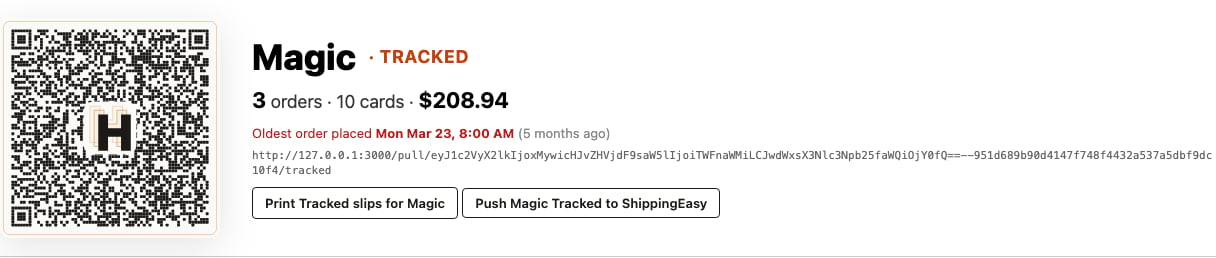
On the Visual Pull page, each game's Tracked row has its own **Push \[Game] Tracked to ShippingEasy** button (for example, **Push Magic Tracked to ShippingEasy**), next to that row's **Print Tracked slips for \[Game]** link. Use it once a game's pull is done and ready to ship.
 ## Push every game at once
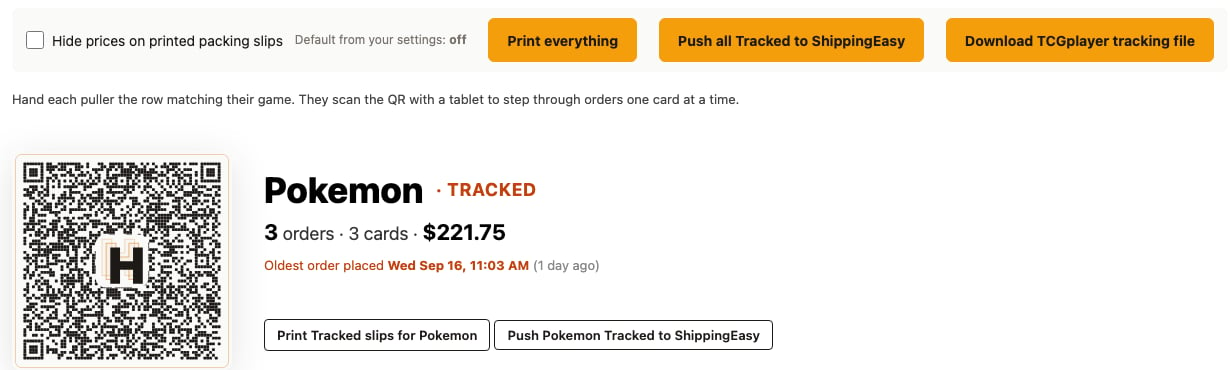
**Push all Tracked to ShippingEasy**, at the top of the Visual Pull page, sends every game's Tracked orders in one click, in the order the games are listed on the page. The same button sits on the active pull's card under **Fulfillment → Pulls**, so a manager can push the whole pull without opening the pull sheet.
## Push every game at once
**Push all Tracked to ShippingEasy**, at the top of the Visual Pull page, sends every game's Tracked orders in one click, in the order the games are listed on the page. The same button sits on the active pull's card under **Fulfillment → Pulls**, so a manager can push the whole pull without opening the pull sheet.
 ## Push a hand-picked batch from Orders
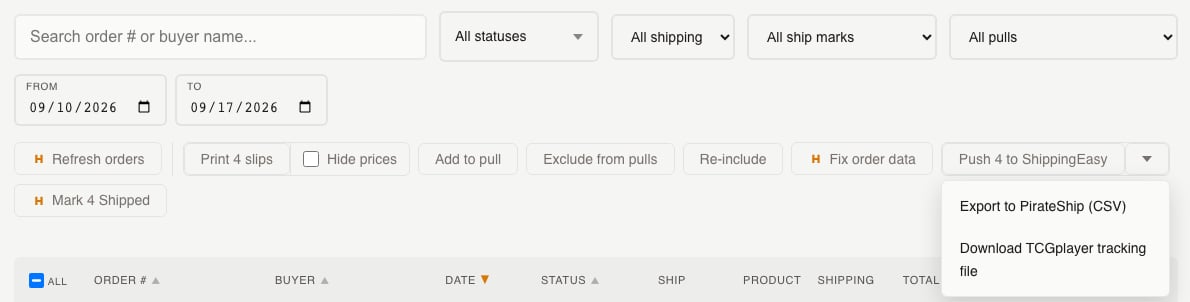
On **Sales → Orders**, select the rows you want with the checkboxes and click **Push to ShippingEasy** in the toolbar's **Labels** control. This is the main button when ShippingEasy is connected; if it isn't, the same control shows **Export to PirateShip** instead, with **Connect ShippingEasy** in its caret menu.
## Push a hand-picked batch from Orders
On **Sales → Orders**, select the rows you want with the checkboxes and click **Push to ShippingEasy** in the toolbar's **Labels** control. This is the main button when ShippingEasy is connected; if it isn't, the same control shows **Export to PirateShip** instead, with **Connect ShippingEasy** in its caret menu.
 ## What the confirmation tells you
However you pushed, Hoard reports back how the batch broke down: how many orders pushed, how many were held for a missing shipping address, how many were PWE and skipped (they don't need a label), how many were already shipped or already carrying tracking and were left alone, and how many failed.
A fully refunded order never reaches this count — it's left out of the push before the confirmation runs.
## What arrives in ShippingEasy
Orders land in the ShippingEasy store you connected, in the same order they appear in your Visual Pull, so your printed label stack should already line up with your pull slips. Each order's line items only include the copies still shipping — a fully refunded line is left off, and a line with 10 of 20 copies refunded arrives as 10 copies. Hoard also sends an estimated package weight based on the card count; see [Shipping labels and tracking](/features/shipping-labels) for the full weight table and what leaves the weight blank.
## Pushing the same order twice is safe
If you push an order that's already in ShippingEasy — because you clicked twice, or retried after an error — Hoard recognizes it as already pushed. It won't create a second order in ShippingEasy or change the weight or line items already sent.
## Common questions
### Which orders get pushed?
Tracked and Expedited orders. Tracked follows your tracking threshold (default \$50, set under **Settings → Repricing**); Expedited orders always count as tracked regardless of value. PWE orders are always skipped.
### Do PWE orders show up in the push at all?
No. They're skipped everywhere in this system, since they ship with a stamp rather than a purchased label. Use **Mark as Shipped** on the Orders tab for those once they're packed.
### What happens to an order with no shipping address yet?
An order with no shipping address yet is held out of the push rather than sent with blank fields. Once the address syncs in from TCGplayer, push it again.
### What if the order was refunded?
A fully refunded order isn't pushed — it's left out. A partial refund still ships; the refunded copies are dropped from the line items and the weight. If a refund lands after you've already bought the label, see [Fix a ShippingEasy order that needs attention](/how-to/fix-a-shippingeasy-order-that-needs-attention).
### Will pushing again after a failed push create a duplicate?
No. A duplicate push counts as already pushed, so retrying is always safe.
## Related
* [Connect ShippingEasy](/connect-shippingeasy)
* [Shipping labels and tracking](/features/shipping-labels)
* [Automate TCGplayer shipping with ShippingEasy](/tutorials/automate-tcgplayer-shipping-with-shippingeasy)
* [Fix a ShippingEasy order that needs attention](/how-to/fix-a-shippingeasy-order-that-needs-attention)
* [Visual Pull](/features/visual-pull)
## What the confirmation tells you
However you pushed, Hoard reports back how the batch broke down: how many orders pushed, how many were held for a missing shipping address, how many were PWE and skipped (they don't need a label), how many were already shipped or already carrying tracking and were left alone, and how many failed.
A fully refunded order never reaches this count — it's left out of the push before the confirmation runs.
## What arrives in ShippingEasy
Orders land in the ShippingEasy store you connected, in the same order they appear in your Visual Pull, so your printed label stack should already line up with your pull slips. Each order's line items only include the copies still shipping — a fully refunded line is left off, and a line with 10 of 20 copies refunded arrives as 10 copies. Hoard also sends an estimated package weight based on the card count; see [Shipping labels and tracking](/features/shipping-labels) for the full weight table and what leaves the weight blank.
## Pushing the same order twice is safe
If you push an order that's already in ShippingEasy — because you clicked twice, or retried after an error — Hoard recognizes it as already pushed. It won't create a second order in ShippingEasy or change the weight or line items already sent.
## Common questions
### Which orders get pushed?
Tracked and Expedited orders. Tracked follows your tracking threshold (default \$50, set under **Settings → Repricing**); Expedited orders always count as tracked regardless of value. PWE orders are always skipped.
### Do PWE orders show up in the push at all?
No. They're skipped everywhere in this system, since they ship with a stamp rather than a purchased label. Use **Mark as Shipped** on the Orders tab for those once they're packed.
### What happens to an order with no shipping address yet?
An order with no shipping address yet is held out of the push rather than sent with blank fields. Once the address syncs in from TCGplayer, push it again.
### What if the order was refunded?
A fully refunded order isn't pushed — it's left out. A partial refund still ships; the refunded copies are dropped from the line items and the weight. If a refund lands after you've already bought the label, see [Fix a ShippingEasy order that needs attention](/how-to/fix-a-shippingeasy-order-that-needs-attention).
### Will pushing again after a failed push create a duplicate?
No. A duplicate push counts as already pushed, so retrying is always safe.
## Related
* [Connect ShippingEasy](/connect-shippingeasy)
* [Shipping labels and tracking](/features/shipping-labels)
* [Automate TCGplayer shipping with ShippingEasy](/tutorials/automate-tcgplayer-shipping-with-shippingeasy)
* [Fix a ShippingEasy order that needs attention](/how-to/fix-a-shippingeasy-order-that-needs-attention)
* [Visual Pull](/features/visual-pull)