> ## Documentation Index
> Fetch the complete documentation index at: https://docs.tryhoard.com/llms.txt
> Use this file to discover all available pages before exploring further.
# How to fix a ShippingEasy order that needs attention
> What every entry in the Visual Pull needs-fix list means and how to clear it.
When something about an order's trip through ShippingEasy needs a person to look at it, Hoard doesn't fail silently — it shows up in a short list on the Visual Pull page, right below the pull toolbar. It only appears when there's something to show, and it names, for example, "3 orders need attention (ShippingEasy fulfillment)."
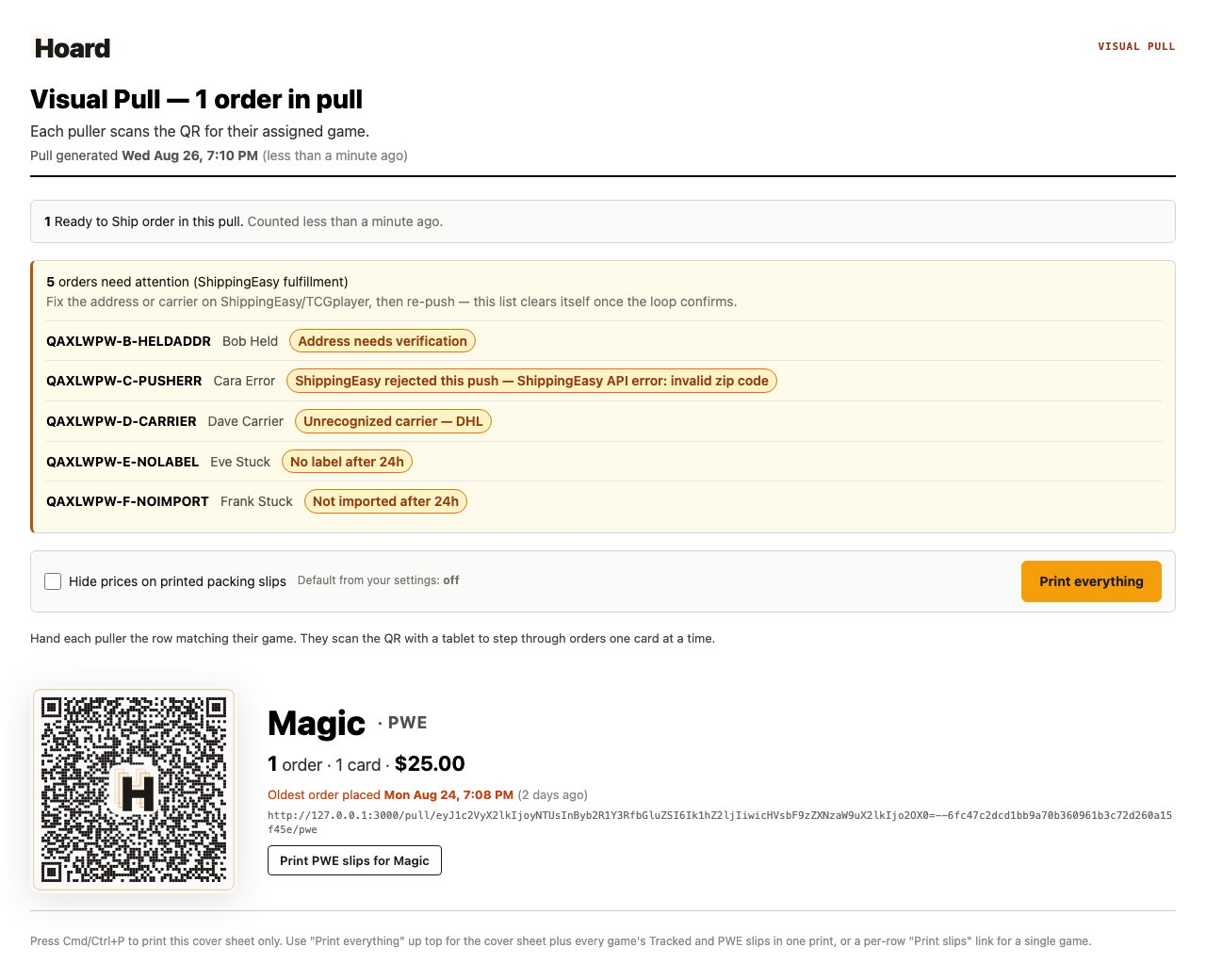 Here's every reason a row can land on that list, what caused it, and how to clear it.
| On the list | What caused it | The fix |
| ----------------------------------------------------------------------- | ------------------------------------------------------------------------------------------------------------------------------------- | ----------------------------------------------------------------------------------------------------------------------------------------- |
| **Address needs verification** | The order was pushed before TCGplayer finished syncing its shipping address. | Wait for the address to sync in, then push the order again. |
| **ShippingEasy rejected this push** | ShippingEasy's API turned down the push. The row shows ShippingEasy's own error text. | Fix what ShippingEasy flagged, then push the order again. |
| **Unrecognized carrier** | The label in ShippingEasy uses a carrier TCGplayer's tracking import doesn't accept — only USPS, FedEx, and UPS go through. | Rebuy or reassign the label under one of those three carriers in ShippingEasy, or enter the tracking on TCGplayer yourself. |
| **TCGplayer rejected this tracking import** | TCGplayer turned down this order's tracking number. The row shows TCGplayer's own error text. | Fix what TCGplayer flagged, then upload the tracking yourself with **Download TCGplayer tracking file** (Orders tab or Visual Pull page). |
| **Label was cancelled** | The label for this order was voided in ShippingEasy, for a reason other than a refund. | Buy a new label in ShippingEasy. Hoard picks up the new tracking on its next check. |
| **Drop-shipped. Check the tracking yourself** | ShippingEasy shows the order fulfilled by a drop-ship vendor instead of a printed label, so Hoard has no label to pull tracking from. | Check tracking with your vendor or in ShippingEasy, and enter it on TCGplayer yourself if it isn't there. |
| **Refunded after the label was bought. Void the label in ShippingEasy** | The order became a full refund after you'd already bought its label, so the postage is already spent. | Void the label yourself in ShippingEasy. Hoard never voids one on its own. |
| **No label after 24h** | The order pushed to ShippingEasy successfully, but nobody's bought a label for it in the last day. | Buy the label in ShippingEasy — it's sitting there waiting. |
| **Not imported after 24h** | Hoard captured a tracking number and carrier over a day ago, but it hasn't reached TCGplayer yet. | If **Auto-ship on TCGplayer** is off, upload the tracking file yourself; if it's on, check the order on TCGplayer directly. |
The last two rows aren't necessarily broken — they're early warnings so a stalled order doesn't go unnoticed for days.
Fix the underlying issue in ShippingEasy or TCGplayer, then push the order again where the table above calls for it. Hoard recalculates this list every time you load the Visual Pull page, so a row drops off as soon as the problem is gone.
## Common questions
### Why did an order that's shipping fine end up on this list?
Two of these reasons are early warnings, not failures: **No label after 24h** means the order reached ShippingEasy but nobody's bought its label yet, and **Not imported after 24h** means Hoard has the tracking but it hasn't reached TCGplayer yet. Buying the label, or checking the Auto-ship toggle, clears them.
### Does the list clear itself, or do I have to dismiss rows?
The needs-fix list clears itself. Fix the underlying issue and push the order again where that applies. Hoard rechecks the list every time you load the Visual Pull page, so there's nothing to dismiss.
### What do I do if an order was refunded after I already bought its label?
Void the label yourself in ShippingEasy. Hoard never voids a label automatically.
### Where does this list live?
The needs-fix list lives on the Visual Pull page, right below the pull toolbar. It's not shown on the Orders tab or anywhere else.
## Related
* [Connect ShippingEasy](/connect-shippingeasy)
* [Push TCGplayer orders to ShippingEasy](/how-to/push-tcgplayer-orders-to-shippingeasy)
* [Shipping labels and tracking](/features/shipping-labels)
* [Visual Pull](/features/visual-pull)
Here's every reason a row can land on that list, what caused it, and how to clear it.
| On the list | What caused it | The fix |
| ----------------------------------------------------------------------- | ------------------------------------------------------------------------------------------------------------------------------------- | ----------------------------------------------------------------------------------------------------------------------------------------- |
| **Address needs verification** | The order was pushed before TCGplayer finished syncing its shipping address. | Wait for the address to sync in, then push the order again. |
| **ShippingEasy rejected this push** | ShippingEasy's API turned down the push. The row shows ShippingEasy's own error text. | Fix what ShippingEasy flagged, then push the order again. |
| **Unrecognized carrier** | The label in ShippingEasy uses a carrier TCGplayer's tracking import doesn't accept — only USPS, FedEx, and UPS go through. | Rebuy or reassign the label under one of those three carriers in ShippingEasy, or enter the tracking on TCGplayer yourself. |
| **TCGplayer rejected this tracking import** | TCGplayer turned down this order's tracking number. The row shows TCGplayer's own error text. | Fix what TCGplayer flagged, then upload the tracking yourself with **Download TCGplayer tracking file** (Orders tab or Visual Pull page). |
| **Label was cancelled** | The label for this order was voided in ShippingEasy, for a reason other than a refund. | Buy a new label in ShippingEasy. Hoard picks up the new tracking on its next check. |
| **Drop-shipped. Check the tracking yourself** | ShippingEasy shows the order fulfilled by a drop-ship vendor instead of a printed label, so Hoard has no label to pull tracking from. | Check tracking with your vendor or in ShippingEasy, and enter it on TCGplayer yourself if it isn't there. |
| **Refunded after the label was bought. Void the label in ShippingEasy** | The order became a full refund after you'd already bought its label, so the postage is already spent. | Void the label yourself in ShippingEasy. Hoard never voids one on its own. |
| **No label after 24h** | The order pushed to ShippingEasy successfully, but nobody's bought a label for it in the last day. | Buy the label in ShippingEasy — it's sitting there waiting. |
| **Not imported after 24h** | Hoard captured a tracking number and carrier over a day ago, but it hasn't reached TCGplayer yet. | If **Auto-ship on TCGplayer** is off, upload the tracking file yourself; if it's on, check the order on TCGplayer directly. |
The last two rows aren't necessarily broken — they're early warnings so a stalled order doesn't go unnoticed for days.
Fix the underlying issue in ShippingEasy or TCGplayer, then push the order again where the table above calls for it. Hoard recalculates this list every time you load the Visual Pull page, so a row drops off as soon as the problem is gone.
## Common questions
### Why did an order that's shipping fine end up on this list?
Two of these reasons are early warnings, not failures: **No label after 24h** means the order reached ShippingEasy but nobody's bought its label yet, and **Not imported after 24h** means Hoard has the tracking but it hasn't reached TCGplayer yet. Buying the label, or checking the Auto-ship toggle, clears them.
### Does the list clear itself, or do I have to dismiss rows?
The needs-fix list clears itself. Fix the underlying issue and push the order again where that applies. Hoard rechecks the list every time you load the Visual Pull page, so there's nothing to dismiss.
### What do I do if an order was refunded after I already bought its label?
Void the label yourself in ShippingEasy. Hoard never voids a label automatically.
### Where does this list live?
The needs-fix list lives on the Visual Pull page, right below the pull toolbar. It's not shown on the Orders tab or anywhere else.
## Related
* [Connect ShippingEasy](/connect-shippingeasy)
* [Push TCGplayer orders to ShippingEasy](/how-to/push-tcgplayer-orders-to-shippingeasy)
* [Shipping labels and tracking](/features/shipping-labels)
* [Visual Pull](/features/visual-pull)