> ## Documentation Index
> Fetch the complete documentation index at: https://docs.tryhoard.com/llms.txt
> Use this file to discover all available pages before exploring further.
# Market Movers & Sleepers
> Track which cards are gaining or losing value, and spot slow-burn trends.
The **Movers** tab shows cards whose market prices changed since your last sync. The **Sleepers** subtab shows cards with slow, steady price movement over 30+ days.
 ## Filtering
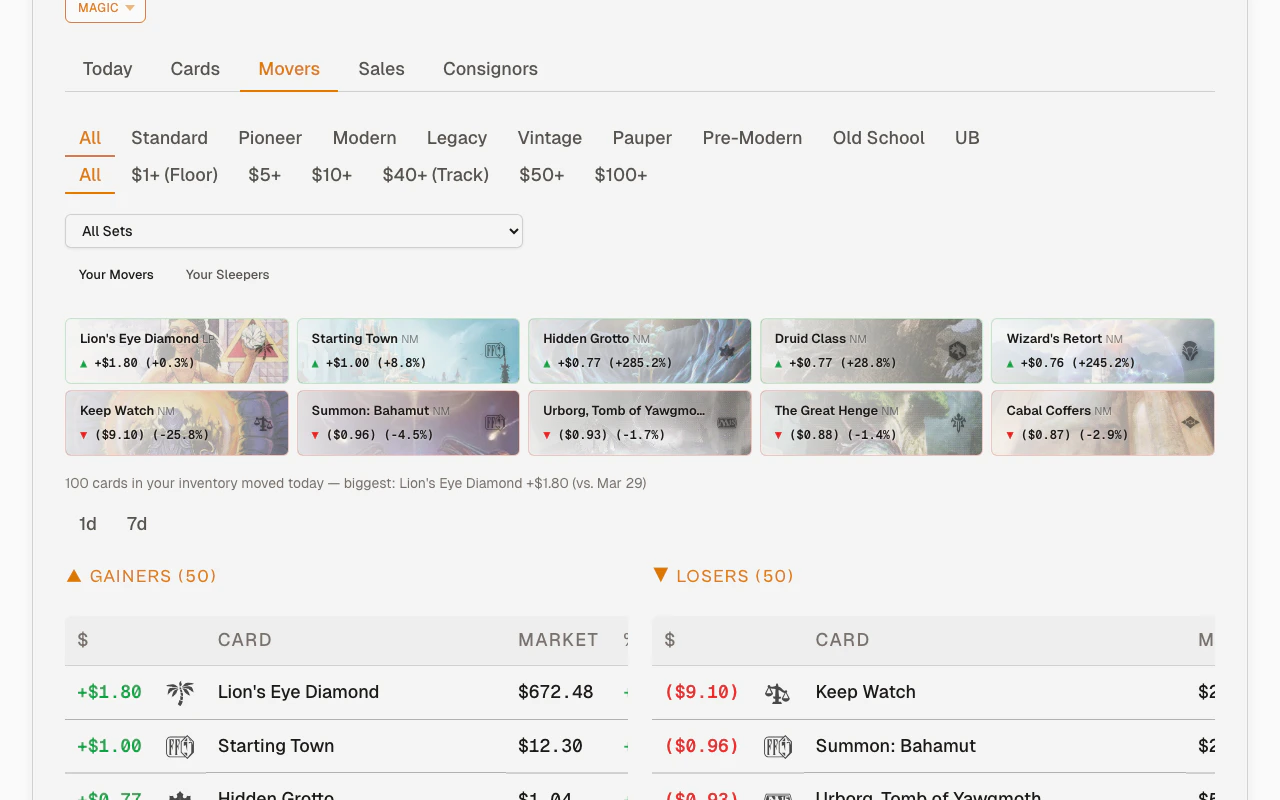
A shared filter bar sits above both the Movers and Sleepers subtabs. Your filter selections carry over when you switch between them.
## Filtering
A shared filter bar sits above both the Movers and Sleepers subtabs. Your filter selections carry over when you switch between them.
 **Game-aware filters:**
* **Magic** shows format buttons (Standard, Pioneer, Modern, etc.) for single-select filtering
* **Pokemon, One Piece, Yu-Gi-Oh** show rarity badge buttons for multi-select filtering (pick multiple rarities like SEC + SR)
* **"All" games** hides the filter row
**Min price presets:** Filter out low-value noise. The preset buttons show your configured **floor price** and **tracking threshold** as labeled shortcuts (e.g., "$1+ (Floor)", "$40+ (Track)").
**Set dropdown:** Narrow to a specific set from your inventory. Only shows sets you actually own cards from.
**Filters persist in the URL.** Bookmark a filtered view and it restores on reload. The time window is included too, so a shortcut can open straight to **Today**, **24h**, **7d**, **30d**, or **90d**.
## Top movers strip
The card strip at the top shows your biggest movers as art thumbnails. It updates when you change filters.
**Game-aware filters:**
* **Magic** shows format buttons (Standard, Pioneer, Modern, etc.) for single-select filtering
* **Pokemon, One Piece, Yu-Gi-Oh** show rarity badge buttons for multi-select filtering (pick multiple rarities like SEC + SR)
* **"All" games** hides the filter row
**Min price presets:** Filter out low-value noise. The preset buttons show your configured **floor price** and **tracking threshold** as labeled shortcuts (e.g., "$1+ (Floor)", "$40+ (Track)").
**Set dropdown:** Narrow to a specific set from your inventory. Only shows sets you actually own cards from.
**Filters persist in the URL.** Bookmark a filtered view and it restores on reload. The time window is included too, so a shortcut can open straight to **Today**, **24h**, **7d**, **30d**, or **90d**.
## Top movers strip
The card strip at the top shows your biggest movers as art thumbnails. It updates when you change filters.
 If one side (gainers or losers) has fewer than 5 cards, the other side fills in the extra slots so the strip stays balanced.
## Gainers and losers
Movers splits **Gainers** and **Losers** into separate subtabs. Each direction gets the full table width, so card names, set symbols, market price, percent change, and trend lines stay easier to scan on desktop and mobile.
If your filters return no matching movers, use **Clear filters** at the bottom of the empty state to reset the tab.
## Market depth badges
Mover rows carry a badge on the right side of the card column when the card's market deserves a second look:
* **`BOUGHT OUT · 2H AGO`** — buyers just cleared the listings for this card and the price is moving right now. The badge carries its own timestamp because it describes the market *at this moment*, not the time window you're viewing.
* **`2 LISTED`** — only that many copies are listed in your card's condition, so the lowest listing price is a weak signal.
The top-mover hero card shows the same badge next to its name. Hover a badge for the one-line explanation, or see [Market depth and watching](/features/market-watch) for everything these signals feed — held price changes, buy-out actions on Today, and watching.
## Card detail panel
Click any card name in the movers or sleepers table (or any card in the spike strip) to open the detail slide-out. It shows the full card image, oracle text, pricing breakdown, and ownership info.
If one side (gainers or losers) has fewer than 5 cards, the other side fills in the extra slots so the strip stays balanced.
## Gainers and losers
Movers splits **Gainers** and **Losers** into separate subtabs. Each direction gets the full table width, so card names, set symbols, market price, percent change, and trend lines stay easier to scan on desktop and mobile.
If your filters return no matching movers, use **Clear filters** at the bottom of the empty state to reset the tab.
## Market depth badges
Mover rows carry a badge on the right side of the card column when the card's market deserves a second look:
* **`BOUGHT OUT · 2H AGO`** — buyers just cleared the listings for this card and the price is moving right now. The badge carries its own timestamp because it describes the market *at this moment*, not the time window you're viewing.
* **`2 LISTED`** — only that many copies are listed in your card's condition, so the lowest listing price is a weak signal.
The top-mover hero card shows the same badge next to its name. Hover a badge for the one-line explanation, or see [Market depth and watching](/features/market-watch) for everything these signals feed — held price changes, buy-out actions on Today, and watching.
## Card detail panel
Click any card name in the movers or sleepers table (or any card in the spike strip) to open the detail slide-out. It shows the full card image, oracle text, pricing breakdown, and ownership info.
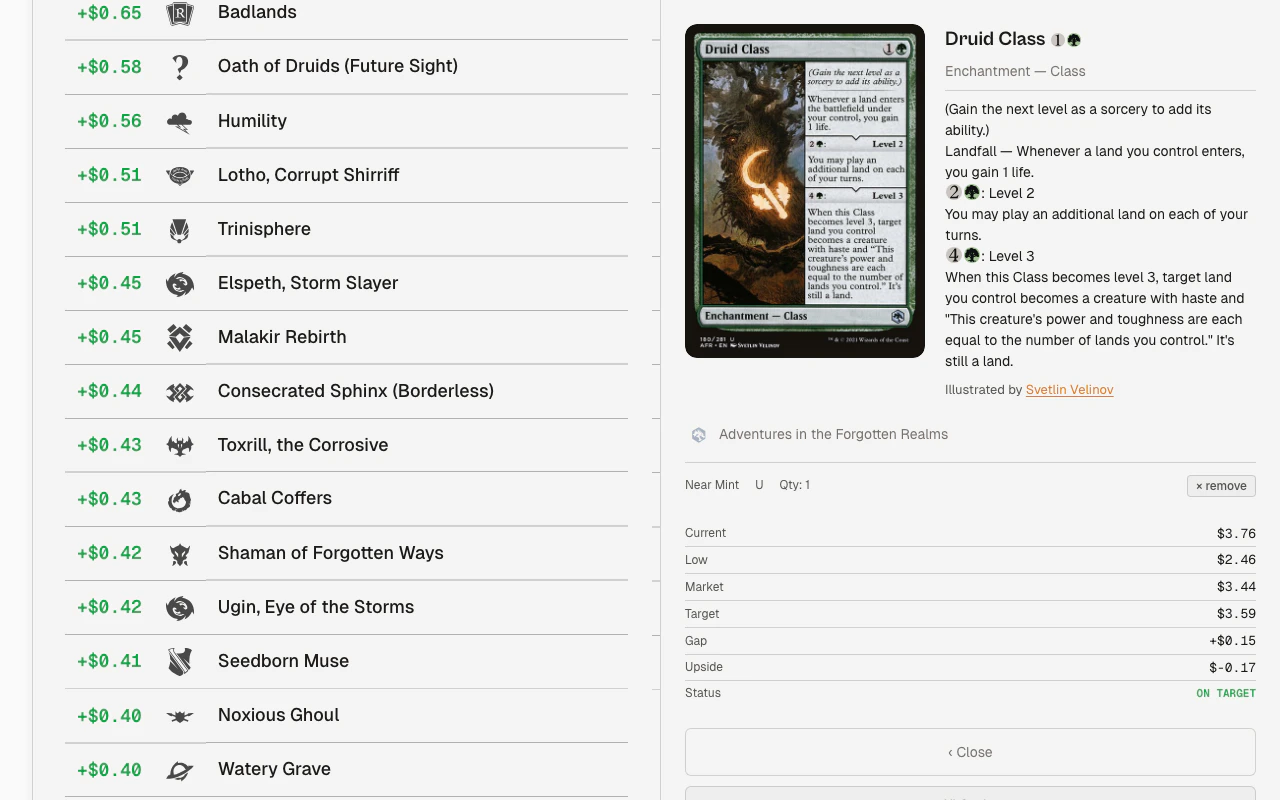 Card data is prefetched in bulk when the page loads, so clicking opens the panel instantly.
Use the **remove** button to clear the active card and close the panel.
## Sleepers
The Sleepers subtab shows cards with sustained price movement (not one-day spikes) over the past 30 days. It uses the same shared filter bar as movers.
Card data is prefetched in bulk when the page loads, so clicking opens the panel instantly.
Use the **remove** button to clear the active card and close the panel.
## Sleepers
The Sleepers subtab shows cards with sustained price movement (not one-day spikes) over the past 30 days. It uses the same shared filter bar as movers.
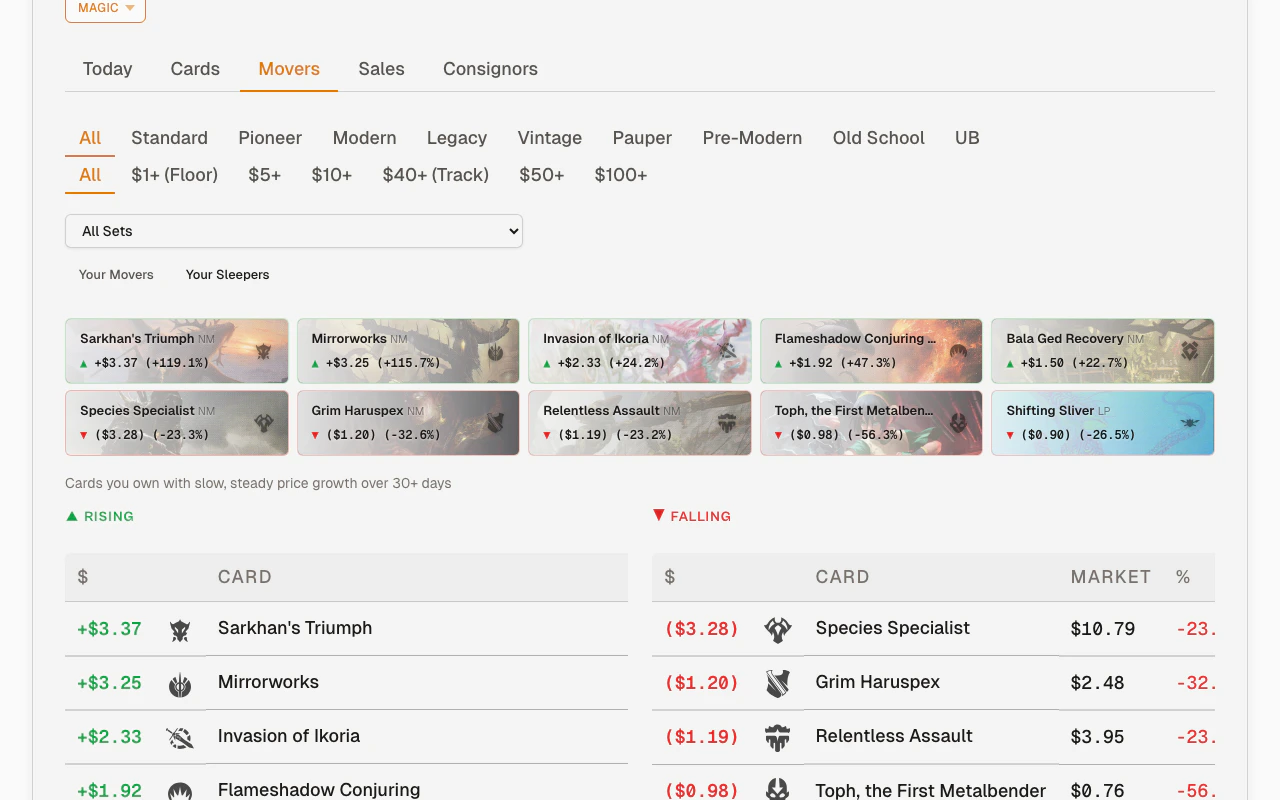 A card qualifies as a sleeper when it has at least a 20% cumulative change AND \$0.50 absolute change, and no single day accounts for more than half the total move.
Sleepers also splits **Rising** and **Falling** into separate subtabs. Rising cards are slow-burn upside; Falling cards are slow-burn downside. The split keeps the table readable when you are working from a phone.
## Why movers matter
Price movements tell you:
* **Cards spiking** — your current price is now below market. The next sync reprices it automatically.
* **Cards dropping** — if you have multiple copies, you might want to sell before it drops further.
* **Slow movers** — rising or falling sleepers can show inventory that deserves a closer look even before it becomes a one-day spike.
* **Market trends** — multiple cards from the same set moving can signal a format rotation, ban list update, or new product release.
## Movers vs. repricing
| | Movers | Repricing |
| ---------- | -------------------------- | ------------------------- |
| **When** | Detected during sync | Applied during sync |
| **What** | Shows market price changes | Updates your listed price |
| **Action** | Informational | Automatic |
A card can be a mover (market price changed) without being repriced (if your price was already above the new target).
A card qualifies as a sleeper when it has at least a 20% cumulative change AND \$0.50 absolute change, and no single day accounts for more than half the total move.
Sleepers also splits **Rising** and **Falling** into separate subtabs. Rising cards are slow-burn upside; Falling cards are slow-burn downside. The split keeps the table readable when you are working from a phone.
## Why movers matter
Price movements tell you:
* **Cards spiking** — your current price is now below market. The next sync reprices it automatically.
* **Cards dropping** — if you have multiple copies, you might want to sell before it drops further.
* **Slow movers** — rising or falling sleepers can show inventory that deserves a closer look even before it becomes a one-day spike.
* **Market trends** — multiple cards from the same set moving can signal a format rotation, ban list update, or new product release.
## Movers vs. repricing
| | Movers | Repricing |
| ---------- | -------------------------- | ------------------------- |
| **When** | Detected during sync | Applied during sync |
| **What** | Shows market price changes | Updates your listed price |
| **Action** | Informational | Automatic |
A card can be a mover (market price changed) without being repriced (if your price was already above the new target).