> ## Documentation Index
> Fetch the complete documentation index at: https://docs.tryhoard.com/llms.txt
> Use this file to discover all available pages before exploring further.
# Chaos Sort
> Shelve a card wherever there is room and let Hoard remember the spot, instead of sorting your shelf by set.
Chaos sort means you put a card wherever there is room instead of keeping the shelf sorted by set or by name. Hoard records where the card went. The location is a box number and a slot number, written as `5-234` for box 5, slot 234. Hoard hands out the numbers as you place cards. A slot is used once. After the card in it sells or you clear it, that slot is not handed out again.
 ## Turning it on
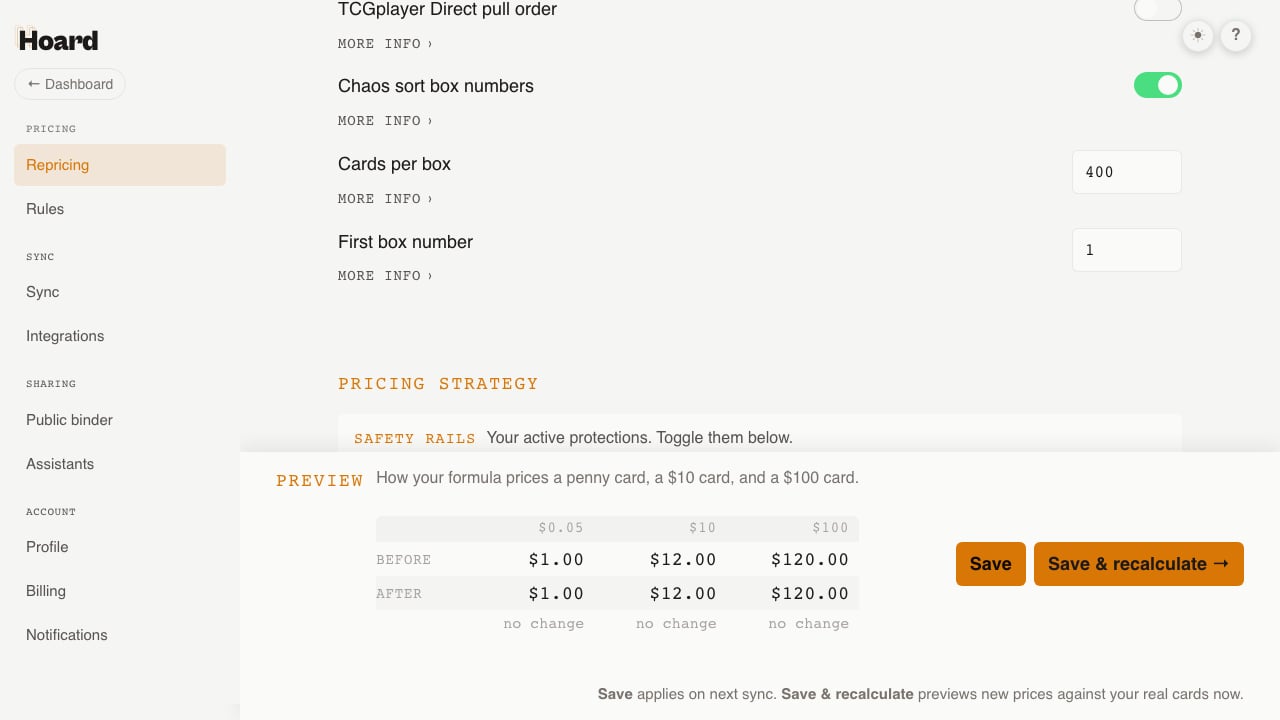
Go to Settings → Repricing and find **Chaos sort box numbers**. There are three settings.
* **Chaos sort box numbers** turns numbering on. It is off by default.
* **Cards per box** is how many slots a box holds before Hoard opens the next box. Set it to the number of cards that fit in your physical boxes.
* **First box number** is where numbering starts. Set it to the next empty box on your shelf, or leave it at 1.
Turning the toggle on changes what happens when you place a card. It does not change the cards you already have, and it does not change what sync does. TCGplayer sync never assigns a location. Those cards are already somewhere in your store, and Hoard does not know where, so it does not guess. Hoard writes a location only when a person places a card: in Quick Add, in scan review, from a CSV import with a Location column, with the Shelve button on a card, or with Shelve results on the Cards tab.
Reading locations does not need the toggle. The Loc column, the search tokens, and the pull sheet work for any account that has locations, including locations that came from an import. The toggle only controls whether new cards get a number as you add them.
## Numbers as you add cards
## Turning it on
Go to Settings → Repricing and find **Chaos sort box numbers**. There are three settings.
* **Chaos sort box numbers** turns numbering on. It is off by default.
* **Cards per box** is how many slots a box holds before Hoard opens the next box. Set it to the number of cards that fit in your physical boxes.
* **First box number** is where numbering starts. Set it to the next empty box on your shelf, or leave it at 1.
Turning the toggle on changes what happens when you place a card. It does not change the cards you already have, and it does not change what sync does. TCGplayer sync never assigns a location. Those cards are already somewhere in your store, and Hoard does not know where, so it does not guess. Hoard writes a location only when a person places a card: in Quick Add, in scan review, from a CSV import with a Location column, with the Shelve button on a card, or with Shelve results on the Cards tab.
Reading locations does not need the toggle. The Loc column, the search tokens, and the pull sheet work for any account that has locations, including locations that came from an import. The toggle only controls whether new cards get a number as you add them.
## Numbers as you add cards
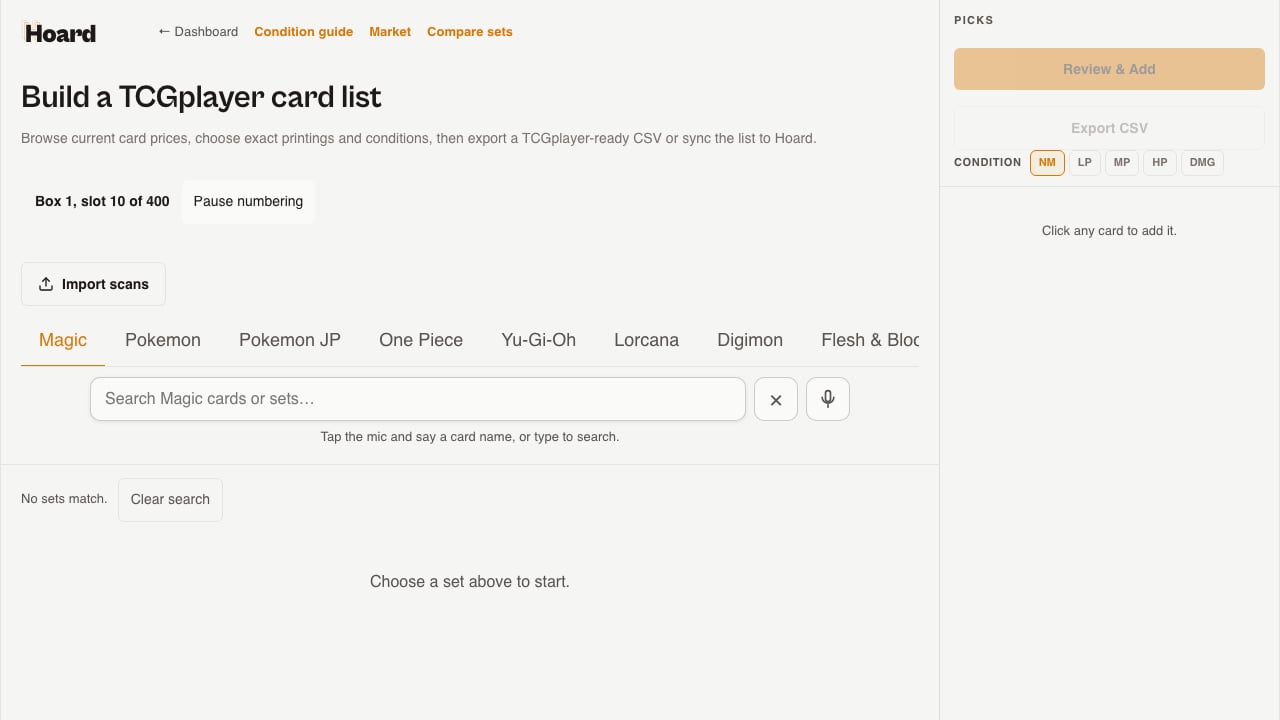 With the toggle on, [Quick Add](/features/quick-add) shows a chip that reads **Box N, slot M of C**. The chip is the box and slot the next card will get. When a box fills, the chip moves to the next box. If you do not want to place a batch right now, click **Pause numbering**. Hoard remembers the choice in this browser, and nothing is numbered until you click Resume numbering.
After you add cards, a list under the chip shows the code for each card. Place the cards in that order.
Scan review works the same way. After you add a scanned batch, the codes for that batch appear under the success notice.
Hoard numbers only the copies a commit added. If the same Quick Add batch is sent twice, the second one numbers nothing. If a card already has more copies than slots, Hoard numbers only the copies that have no slot.
Copies added together share one slot. Four copies of a card added in one commit get one slot with a quantity of 4.
## Finding cards on the Cards tab
With the toggle on, [Quick Add](/features/quick-add) shows a chip that reads **Box N, slot M of C**. The chip is the box and slot the next card will get. When a box fills, the chip moves to the next box. If you do not want to place a batch right now, click **Pause numbering**. Hoard remembers the choice in this browser, and nothing is numbered until you click Resume numbering.
After you add cards, a list under the chip shows the code for each card. Place the cards in that order.
Scan review works the same way. After you add a scanned batch, the codes for that batch appear under the success notice.
Hoard numbers only the copies a commit added. If the same Quick Add batch is sent twice, the second one numbers nothing. If a card already has more copies than slots, Hoard numbers only the copies that have no slot.
Copies added together share one slot. Four copies of a card added in one commit get one slot with a quantity of 4.
## Finding cards on the Cards tab
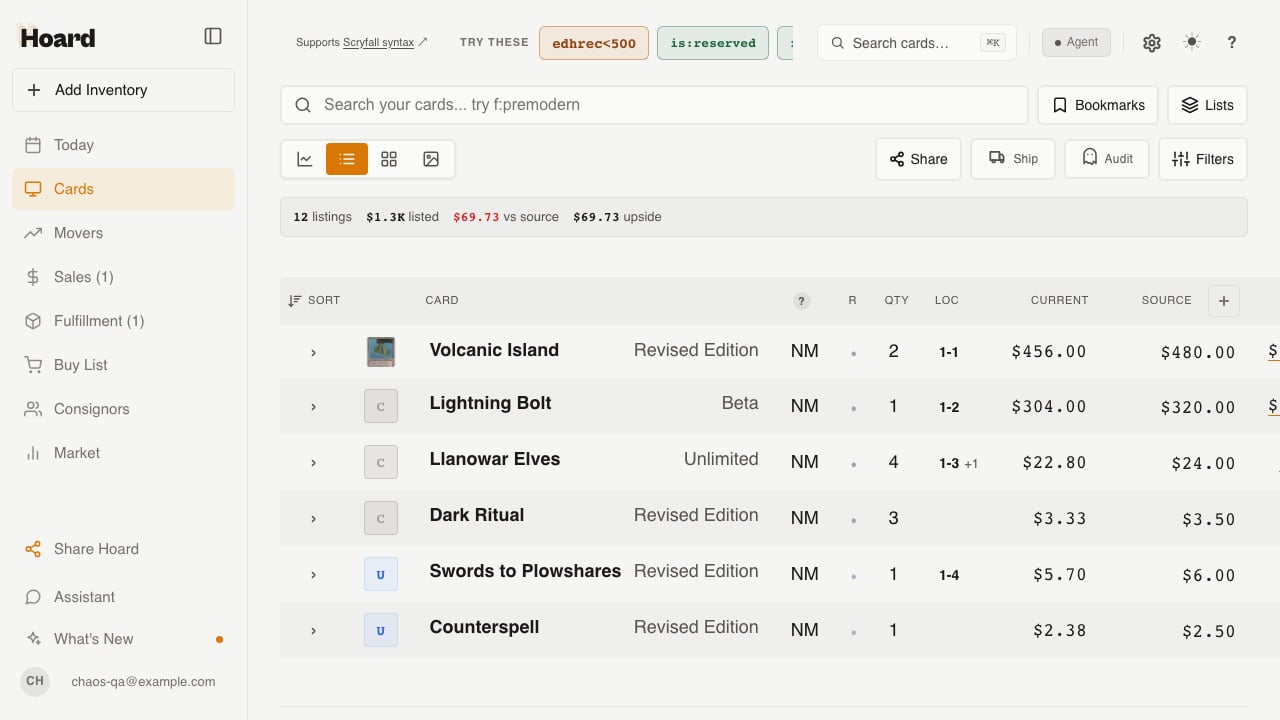 The Cards tab has a Loc column. It shows the card's first open slot. When copies of a card are in more than one slot, the column adds `+N`. In the screenshot, Llanowar Elves reads `1-3 +1`: one slot at `1-3` and one more slot. Click the column header to sort by location. Cards with no location sort last.
On a phone, the grid view adds the code to the set and condition line on each tile.
Four search tokens work with the rest of the [search syntax](/features/advanced-search).
| Token | Matches |
| ------------------- | ------------------------------------------------------------- |
| `box:5` | cards with an open slot in box 5 |
| `loc:5-234` | the card in that slot |
| `is:unshelved` | cards with copies on hand that have no slot |
| `is:location-drift` | cards where the shelf record holds more copies than the count |
The tokens combine with other tokens, for example `box:5 game:magic` or `is:unshelved price>20`.
## The Location row on the card panel
The Cards tab has a Loc column. It shows the card's first open slot. When copies of a card are in more than one slot, the column adds `+N`. In the screenshot, Llanowar Elves reads `1-3 +1`: one slot at `1-3` and one more slot. Click the column header to sort by location. Cards with no location sort last.
On a phone, the grid view adds the code to the set and condition line on each tile.
Four search tokens work with the rest of the [search syntax](/features/advanced-search).
| Token | Matches |
| ------------------- | ------------------------------------------------------------- |
| `box:5` | cards with an open slot in box 5 |
| `loc:5-234` | the card in that slot |
| `is:unshelved` | cards with copies on hand that have no slot |
| `is:location-drift` | cards where the shelf record holds more copies than the count |
The tokens combine with other tokens, for example `box:5 game:magic` or `is:unshelved price>20`.
## The Location row on the card panel
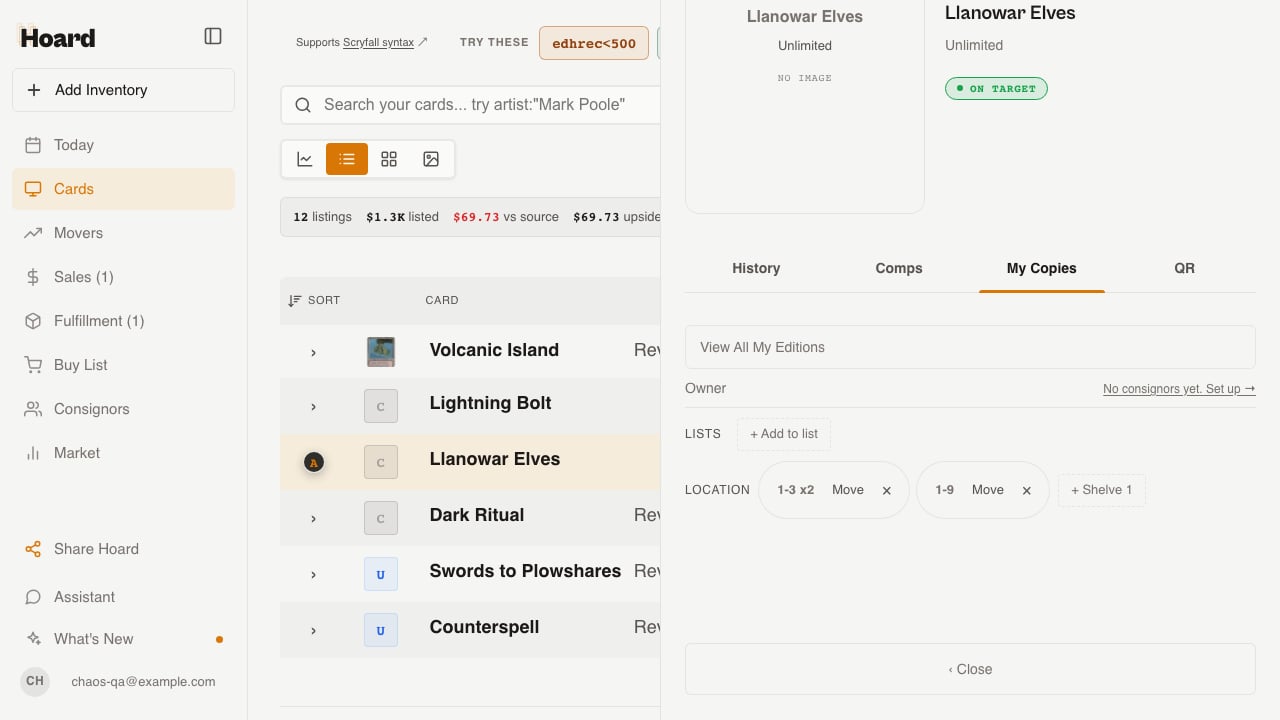 Open a card and click **My Copies**. The Location row shows one chip per open slot. In the screenshot, Llanowar Elves has two chips: `1-3 x2` for two copies in one slot, and `1-9` for one copy. Click a chip to filter the Cards tab to that slot.
Each chip has two controls.
* **Move** opens an input. Type a new code and press Enter. Hoard refuses a slot that holds a different card. If the new slot already holds a stack of the same card, the two stacks merge into that slot.
* **×** clears the slot. The copies become unshelved, and the slot is retired.
If the card has copies with no slot, a **+ Shelve N** button numbers them from the panel.
## Shelving stock you already have
Turning on chaos sort does not number cards you already own. To shelve existing stock, use **Shelve results**. It is in the Export panel on the Cards tab, next to Add results to a list and Print QR labels.
Filter the table to the cards you want to place. Sort the table in the order you will walk the shelf. Then click Shelve results. Hoard numbers every unshelved copy in the filtered set, in the table's current order, up to 500 cards per click. The sort order decides which card gets which slot, so sort the table the way you will place the cards.
For more than 500 cards, click again. Cards that were just shelved leave the `is:unshelved` filter, so the next click starts where the last one stopped.
## The pull sheet
Once the account has an open location, the [Visual Pull](/features/visual-pull) overview has a **Box + slot** sort. It orders lines by box, then by slot. Lines with no location come last. Each line shows the slot or slots that cover its quantity. An order for two copies split across two slots reads `3-40, 3-41`. When two orders in one pull need the same card, each line is sent to a different slot.
Open a card and click **My Copies**. The Location row shows one chip per open slot. In the screenshot, Llanowar Elves has two chips: `1-3 x2` for two copies in one slot, and `1-9` for one copy. Click a chip to filter the Cards tab to that slot.
Each chip has two controls.
* **Move** opens an input. Type a new code and press Enter. Hoard refuses a slot that holds a different card. If the new slot already holds a stack of the same card, the two stacks merge into that slot.
* **×** clears the slot. The copies become unshelved, and the slot is retired.
If the card has copies with no slot, a **+ Shelve N** button numbers them from the panel.
## Shelving stock you already have
Turning on chaos sort does not number cards you already own. To shelve existing stock, use **Shelve results**. It is in the Export panel on the Cards tab, next to Add results to a list and Print QR labels.
Filter the table to the cards you want to place. Sort the table in the order you will walk the shelf. Then click Shelve results. Hoard numbers every unshelved copy in the filtered set, in the table's current order, up to 500 cards per click. The sort order decides which card gets which slot, so sort the table the way you will place the cards.
For more than 500 cards, click again. Cards that were just shelved leave the `is:unshelved` filter, so the next click starts where the last one stopped.
## The pull sheet
Once the account has an open location, the [Visual Pull](/features/visual-pull) overview has a **Box + slot** sort. It orders lines by box, then by slot. Lines with no location come last. Each line shows the slot or slots that cover its quantity. An order for two copies split across two slots reads `3-40, 3-41`. When two orders in one pull need the same card, each line is sent to a different slot.
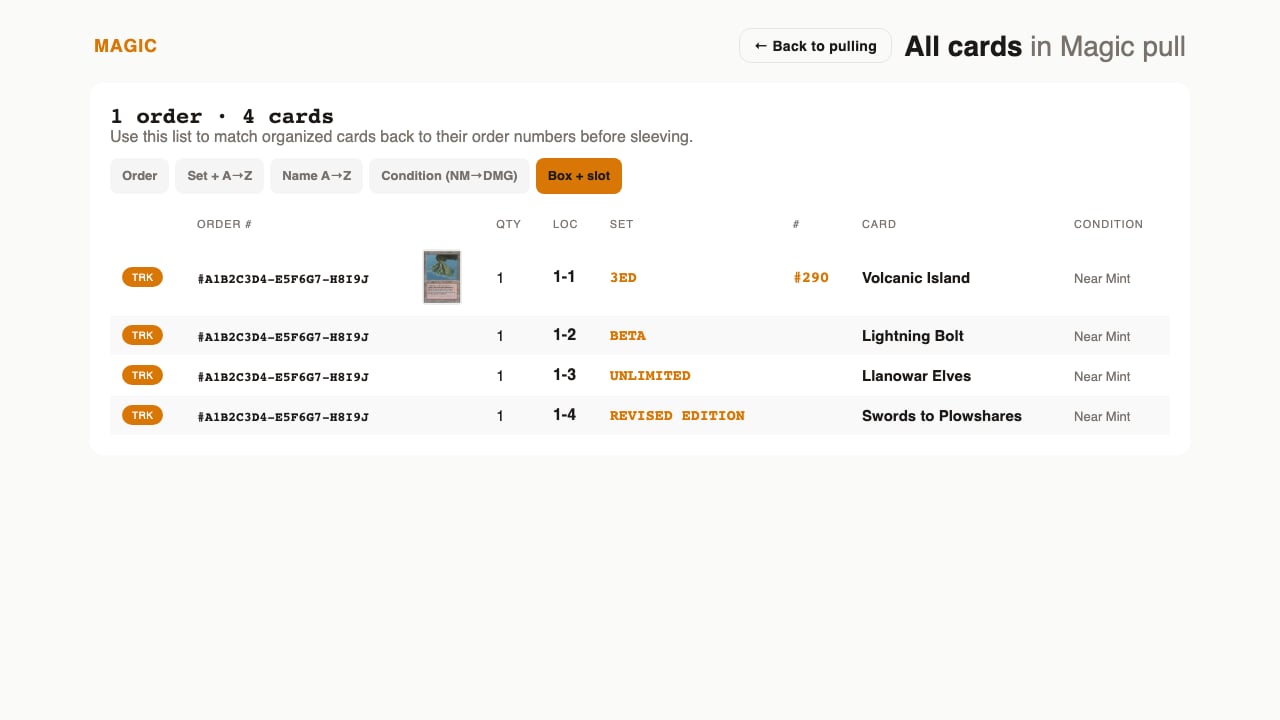 The codes also print on packing slips and appear on the line items in the Orders tab.
Completing a pull frees the copies that shipped. For each shipped line, Hoard releases one copy from the card's oldest slot. This happens once per completion. A fully refunded line releases nothing. A partly refunded line releases only the copies that shipped.
The pull sheet's Report a problem menu has a **Not at its box and slot** option for a card that was not where the sheet said.
Custom listings and photo listings have no catalog SKU on the order line, so the pull sheet shows no location for them.
## Importing locations from another tool
The inventory CSV import accepts a **Location** column. Hoard also reads the headers Storage Location, Bin, Box, Slot, and Chaos Sort. These formats are accepted.
* `5-234` and `005-0234`: box and slot, with or without leading zeros
* `B5-#234`: the SortSwift format
* `BOX-A-001` and `A-001`: the TCG Actana format, including lettered boxes
A lettered box such as `A` becomes a numbered box with the letter as its label. Hoard creates it at the next free box number.
Uploading the same file twice changes nothing, because only unshelved copies are placed. A slot that already holds a different card is skipped and counted. A value Hoard cannot read is counted. The counts appear in a message on the dashboard after the import.
## Drift
`is:location-drift` finds cards whose open slots hold more copies than the card's on-hand quantity. The usual causes are a copy that shipped outside a Hoard pull and a slot that was never cleared.
To fix a card, open it, click My Copies, and either move the slot to where the card is or clear the slot. Hoard does not clear drift on its own.
To turn the drift results into a read-only physical count queue before you correct a record, see [Find shelf records that need a human count with an AI assistant](/how-to/ai-assistant/find-location-drift-with-ai). A location mismatch is metadata to investigate, not proof of what is on the shelf.
## API
Rows from `/api/cards` and the response from `/api/cards/:id/detail` include three fields. `locations` is an array of open slots, oldest first, each with `id`, `box`, `slot`, `code`, `quantity`, and `placed_at`. `location_code` is the first code, or null when the card has no slot. `unshelved_quantity` is the number of copies with no slot. Pass `sort=location` to sort by box and slot. The [Card lists](/api-reference/lists) page shows the shelf tokens in search. Assistants connected through MCP can read locations but cannot shelve or move cards.
## What it does not do yet
* There is no renumber or compaction tool. Cleared slots stay empty.
* Slots are not reused. A cleared box and slot pair is retired.
* Custom listings and photo listings show no location on the pull sheet.
The codes also print on packing slips and appear on the line items in the Orders tab.
Completing a pull frees the copies that shipped. For each shipped line, Hoard releases one copy from the card's oldest slot. This happens once per completion. A fully refunded line releases nothing. A partly refunded line releases only the copies that shipped.
The pull sheet's Report a problem menu has a **Not at its box and slot** option for a card that was not where the sheet said.
Custom listings and photo listings have no catalog SKU on the order line, so the pull sheet shows no location for them.
## Importing locations from another tool
The inventory CSV import accepts a **Location** column. Hoard also reads the headers Storage Location, Bin, Box, Slot, and Chaos Sort. These formats are accepted.
* `5-234` and `005-0234`: box and slot, with or without leading zeros
* `B5-#234`: the SortSwift format
* `BOX-A-001` and `A-001`: the TCG Actana format, including lettered boxes
A lettered box such as `A` becomes a numbered box with the letter as its label. Hoard creates it at the next free box number.
Uploading the same file twice changes nothing, because only unshelved copies are placed. A slot that already holds a different card is skipped and counted. A value Hoard cannot read is counted. The counts appear in a message on the dashboard after the import.
## Drift
`is:location-drift` finds cards whose open slots hold more copies than the card's on-hand quantity. The usual causes are a copy that shipped outside a Hoard pull and a slot that was never cleared.
To fix a card, open it, click My Copies, and either move the slot to where the card is or clear the slot. Hoard does not clear drift on its own.
To turn the drift results into a read-only physical count queue before you correct a record, see [Find shelf records that need a human count with an AI assistant](/how-to/ai-assistant/find-location-drift-with-ai). A location mismatch is metadata to investigate, not proof of what is on the shelf.
## API
Rows from `/api/cards` and the response from `/api/cards/:id/detail` include three fields. `locations` is an array of open slots, oldest first, each with `id`, `box`, `slot`, `code`, `quantity`, and `placed_at`. `location_code` is the first code, or null when the card has no slot. `unshelved_quantity` is the number of copies with no slot. Pass `sort=location` to sort by box and slot. The [Card lists](/api-reference/lists) page shows the shelf tokens in search. Assistants connected through MCP can read locations but cannot shelve or move cards.
## What it does not do yet
* There is no renumber or compaction tool. Cleared slots stay empty.
* Slots are not reused. A cleared box and slot pair is retired.
* Custom listings and photo listings show no location on the pull sheet.